Free Automation Studio Alternative: Simulate Hydraulics, Pneumatics, Relay Logic and PLC Ladder Online
- MechSimulator's free Hydraulic Circuit, Pneumatic Circuit, Electro-Pneumatic Circuit and PLC Ladder Logic simulators cover the core teaching ground of Automation Studio in a browser, with no download, account or licence.
- Each circuit tool ships 11 ready-made circuits; the electro-pneumatic tool puts the air circuit and its 24 V relay ladder on one sheet, and the PLC tool has 27 IEC 61131-3 ladder instructions plus a function block view.
- What you give up: manufacturer catalogues, bills of materials, sizing worksheets, a PLC linked to the fluid circuit, real hardware connection and vendor support. For design work and certification-grade sizing, Automation Studio is still the right tool.
A free alternative to Automation Studio for learning is MechSimulator's set of browser simulators: the Hydraulic Circuit Simulator, the Pneumatic Circuit Simulator, the Electro-Pneumatic Circuit Simulator and the PLC Ladder Logic Simulator, all free, with no download or account. That's the short answer. The longer one depends on what you actually need Automation Studio for.
Automation Studio, made by Famic Technologies, is a design and simulation package that covers hydraulics, pneumatics, electrical control, PLC programming and more in one environment. It's built for engineers who design machines and for schools that teach the whole chain. Our tools are narrower. They're built for the student who needs to understand why a cylinder holds, why a relay latches and why a rung goes true, tonight, on whatever laptop is in front of them. Product names mentioned here are trademarks of their respective owners; MechSimulator is not affiliated with Famic Technologies.
Why look for an Automation Studio alternative at all?
Here's a week I've seen more than once. A fluid power unit starts on Monday. The college has Automation Studio on a handful of lab PCs, booked by three classes. By Wednesday, a group of second-year students has a sequencing assignment due: a pneumatic cylinder, two solenoids, a start button, a stop button and a latch. They understand the pneumatic half. The relay half is where they stall, and they can't get back on the lab machines until next week.
So they draw it on paper. Paper doesn't argue back. A wrong seal-in contact looks just as tidy as a right one.
That gap is the reason this article exists. A program running on a booked PC in one room can't cover home revision, a phone on the bus or a Chromebook in a classroom with no admin rights. Famic does not publish prices on its site; buyers are asked to request a quote. For many TVET centres, that conversation simply doesn't happen. A free browser tool doesn't replace the professional package. It fills the hours between lab sessions.
What do the four free tools cover?
Think of the four pages as one workflow: power the actuator with oil or air, control it with relays, then move the logic into a PLC. That's the same order most automation courses teach in, and it's the main difference from our FluidSIM alternative guide, which stays on the fluid power side.
Hydraulics: 51 components and fault injection
The Hydraulic Circuit Simulator has 51 components in its palette, drawn as ISO 1219 symbols, and 11 ready-made circuits: Meter-In, Meter-Out, Regenerative, Sequence, Bleed-Off, Counterbalance, Safety, Priority, Sync Cylinders, Precision Speed and Pilot DCV. Pressures, flows and cylinder speeds come from a solver, not from a fixed animation, and an SI | Imperial switch moves everything between bar, L/min and kN and psi, gpm and lbf.
The part students remember is the fault menu. Seven faults can be switched on while the circuit runs, among them pump failure, a 50% external leak, a blocked filter, oil overheating, a relief valve stuck closed, pump cavitation and air ingress. Troubleshooting is where real technicians earn their pay, so it's worth an hour of class time.
Pneumatics: 52 components and 11 circuits
The Pneumatic Circuit Simulator offers 52 components and 11 presets, from Direct Control and Speed Control through AND Logic, OR Logic, Time Delay and Stroke Limit to Sequential A+B+, Cascade, Vacuum Pick and Pilot Control. Valves are rated by nominal flow and the flow model chokes the way compressed air really does, so a meter-out throttle sets a piston speed that hardly changes with load. That's a lesson most paper exercises never reach.
Electrical control: relay ladder and solenoid valves on one sheet
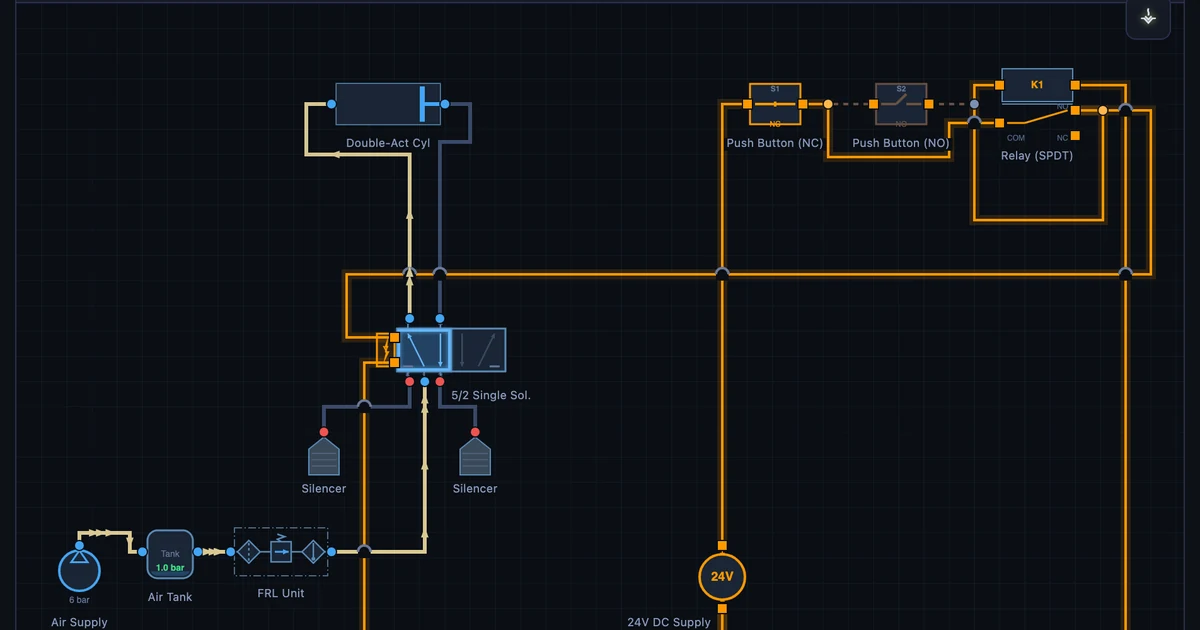
This is the piece people forget when they ask about Automation Studio alternatives. The Electro-Pneumatic Circuit Simulator has 69 components, 11 presets and two domains on the same canvas: the air circuit and its 24 V DC control. Push buttons, relays with NO and NC contacts, reed switches, timers, counters and solenoids sit next to the valves they drive. The presets run from Direct Solenoid and Self-Holding to Two-Hand Safety, Emergency Stop, Multi-Contact Relay, Batch Counter and Solenoid Pilot.
In the hero image I loaded Self-Holding, pressed Run and gave the start button S2 one tap. K1 latched through its own NO contact. With the button released, the readouts still showed Solenoids Active 1, a supply of 6.0 bar and 24 V, and the 50 mm double-acting cylinder sat at the end of its stroke. Pressing S1 breaks the latch. That is the seal-in circuit every automation student must understand, built and tested in about thirty seconds.
PLC ladder logic: 27 instructions and an FBD view
The PLC Ladder Logic Simulator follows IEC 61131-3 and uses the instruction names an Allen-Bradley user will recognise. Its palette lists 27 ladder instructions: 4 contacts, 5 coils, 4 timers (TON, TOF, TP, RTO), 3 counters (CTU, CTD, CTUD), 6 compare and 5 math instructions, plus branch start and end. A function block diagram view sits beside the ladder, and 11 example programs include Motor Start/Stop, Traffic Light, Conveyor Counter, Tank Level and Star-Delta.
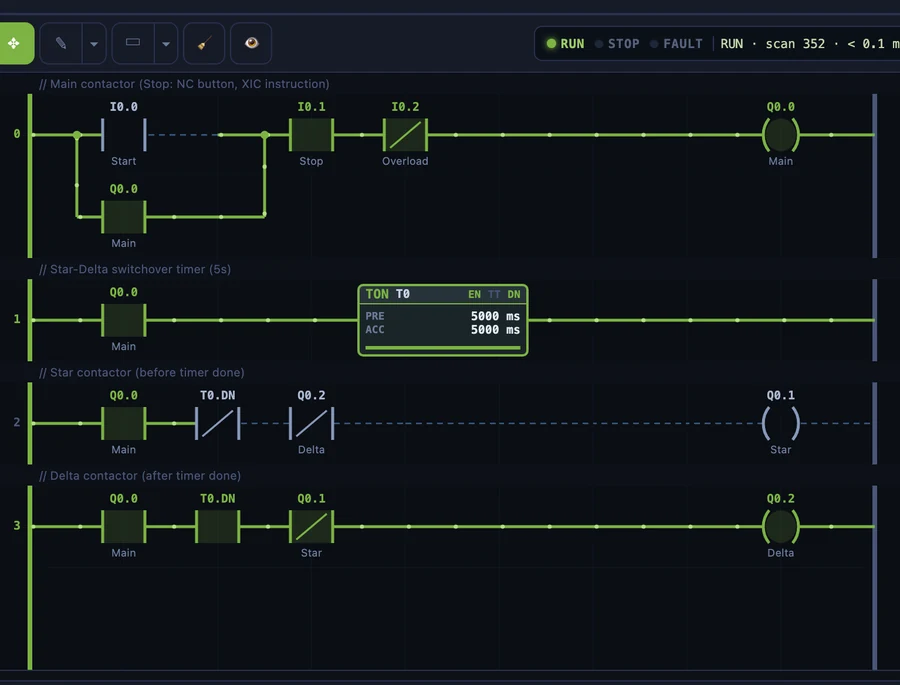
Star-delta is a nice bridge because it's the same job a relay panel does with a timer relay. Students who have just built the Self-Holding latch see it again in rung 0, now written as a contact named Q0.0 under the Start contact. Rung 2 and rung 3 interlock each other with NC contacts, so star and delta can never be on together. The 5 s changeover is a number you can change and watch.
The cylinder itself
If a design question needs numbers rather than a circuit, the Hydraulic Cylinder Calculator works out force, speed and buckling for a single cylinder. Treat it as a teaching calculator, not certified sizing.
How do they compare with Automation Studio?
The facts about Automation Studio below come from Famic Technologies' own product pages, checked on 23 November 2026. Where a cell says "not stated", the vendor's pages didn't say.
| Feature | Automation Studio (Famic Technologies) | MechSimulator (free tools) |
|---|---|---|
| Price | Not published; request a quote | Free, no account |
| How it runs | Not stated on the pages checked; the Educational Edition lists remote access for e-learning | Any modern browser, including tablets |
| Hydraulics and pneumatics | Yes, ISO 1219-1 and 1219-2 compliant libraries | Yes, ISO 1219 symbols, 51 and 52 components, 11 presets each |
| Electrical control | Electrical control, motor control, AC/DC, American and European standards | 24 V DC relay ladder with solenoid valves (electro-pneumatic tool only) |
| PLC programming | Allen-Bradley, Siemens, LSIS and IEC 61131-3 symbol sets | IEC 61131-3 ladder with Allen-Bradley-style names, plus FBD |
| PLC wired to the fluid circuit | Yes, technologies linked into a virtual machine | No, the PLC tool is separate |
| Manufacturer catalogues | Yes, "extensive manufacturers' catalogue" | No, generic components with editable values |
| Bill of materials and reports | Yes, BOM, purchase list, cable list | No; PNG and JSON export, share link |
| Sizing | Calculation worksheets for hydraulic, pneumatic and electrical components | Teaching calculator for one hydraulic cylinder |
| Real hardware | I/O interface kit or OPC client/server | None |
| Fault simulation | Component failures, pre-set or manual | 7 injectable faults in the hydraulic tool |
| Support and teaching material | Vendor support; Teachware for licence holders on a maintenance plan | Built-in guides, Explore, Practice and Quiz modes; no paid support |
Read that table honestly. Automation Studio wins every row that matters to a design office: real parts, documentation, linked technologies, hardware-in-the-loop testing and someone to call when it breaks. Our tools win on cost and on reach. Neither fact cancels the other.
When should you still use Automation Studio?
Use the professional package when the output has to leave the classroom. If a drawing goes to a customer, needs real part numbers, feeds a purchase list or has to prove a pump and valve size against a datasheet, a free teaching simulator is the wrong tool. The same goes for testing a real PLC against a virtual machine over OPC, or for any course whose assessment is built around Famic's own teaching material.
Use the free tools for everything before that: first contact with ISO symbols, tracing flow paths, latches and interlocks, timers and counters, and the hundred small "what if I move this contact" experiments that make a student confident. In my experience the two work well together. Students who've broken a seal-in circuit twenty times in a browser use their booked lab hour far better.
How would I run a week with these tools?
Day 1, actuators. Load Meter-In and Meter-Out in the hydraulic tool. Ask which one controls an overrunning load, then switch on the blocked filter fault and ask what changed.
Day 2, air. Build AND Logic and OR Logic in the pneumatic tool, then Sequential A+B+. Students trace the pilot signal before they press Run.
Day 3, relays. Open Self-Holding in the electro-pneumatic tool. Tap start, release it, and ask why the cylinder stays out. Then delete K1's own contact and run it again.
Day 4, PLC. Load Motor Start/Stop, then Star-Delta. Students rewrite the Day 3 latch as a ladder rung and compare. The logic is identical; only the hardware changed. If your class needs the Boolean background first, the logic gates teaching guide covers how AND, OR and NOT map onto series contacts, parallel branches and NC contacts.
Try It Yourself
All tools below are free. No account, no download.
Key Takeaways
- A free Automation Studio alternative for learning is MechSimulator's Hydraulic Circuit, Pneumatic Circuit, Electro-Pneumatic Circuit and PLC Ladder Logic simulators, all browser-based and free.
- The hydraulic, pneumatic and electro-pneumatic tools have 51, 52 and 69 components and 11 ready-made circuits each; the hydraulic tool adds 7 injectable faults.
- The electro-pneumatic tool puts a 24 V relay ladder and the air circuit on one sheet, so latches, interlocks and two-hand safety can be tested before any PLC appears.
- The PLC simulator has 27 IEC 61131-3 ladder instructions with Allen-Bradley-style names, a function block view and 11 example programs such as Star-Delta.
- Automation Studio still leads on manufacturer catalogues, bills of materials, sizing worksheets, linking a PLC to the fluid circuit, OPC and I/O hardware connection, and vendor support.
- Famic Technologies publishes no price on its site; its free Automation Studio Viewer opens projects read-only and is not a simulation licence.
Frequently Asked Questions
What is a free alternative to Automation Studio?
MechSimulator offers four free browser tools that together cover the main teaching areas of Automation Studio: the Hydraulic Circuit Simulator, the Pneumatic Circuit Simulator, the Electro-Pneumatic Circuit Simulator (relay ladder control of solenoid valves) and the PLC Ladder Logic Simulator. They need no download, account or licence. They are a learning alternative, not a replacement for professional design work.
Can I simulate hydraulics, pneumatics and PLC ladder logic in one free tool?
Not in one program. MechSimulator splits the work across separate pages: hydraulics, pneumatics, electro-pneumatics with relay ladder control, and a PLC ladder logic simulator. The electro-pneumatic page puts the air circuit and its 24 V relay control on one sheet, but a PLC program cannot yet be wired to a fluid power circuit the way Automation Studio links its technologies.
Does MechSimulator include manufacturer component libraries like Automation Studio?
No. The circuit simulators use generic ISO 1219 components with editable parameters such as bore, stroke, pressure and flow. Automation Studio advertises an extensive manufacturers' catalogue, bills of materials and calculation worksheets. If you need a real part number or a purchase list, use the vendor tool.
Can the free PLC simulator connect to a real PLC?
No. The PLC Ladder Logic Simulator runs entirely in the browser and has no hardware or OPC connection. It teaches IEC 61131-3 ladder and function block logic with Allen-Bradley-style instruction names, 27 ladder instructions and 11 example programs. Downloading to real hardware still needs the PLC maker's own software.
Is Automation Studio free for students?
Famic Technologies does not publish a price on its website. It sells a Professional Edition and an Educational Edition and asks buyers to request a quote or a live online demo. It also offers a free Automation Studio Viewer that opens projects in read-only mode, which is not the same as a free design and simulation licence.
Automation is learned in layers: oil and air first, then the relays that switch them, then the PLC that replaces the relays. Each layer needs repetition, and repetition needs a tool the student can open whenever the question comes up, not only when the lab is free.
Start with the Electro-Pneumatic Circuit Simulator: load Self-Holding, tap start once, and then try to make the cylinder stop without touching the stop button.