
Free LogixPro and RSLogix Simulator Alternative: Practise PLC Ladder Logic Online
A free alternative to LogixPro or RSLogix is MechSimulator's PLC Ladder Logic Simulator, a browser-based ladder logic trainer that lets you build, run and debug PLC programs with contacts, coils, timers, counters, compare and math instructions, with no download, licence or account. It won't replace Rockwell or Siemens software on a real job. But for the hours of practice that come before you touch a real controller, it covers the fundamentals and runs on any laptop, Chromebook or tablet.
- The free simulator has 27 ladder instructions plus 2 branch tools, 11 working presets, 8 inputs, 8 outputs and live power-flow highlighting, plus a Function Block Diagram (FBD) view.
- LogixPro (being renamed Professor Bill's LadderLab) is a paid, Windows-only trainer built around the Allen-Bradley SLC 500 instruction set, with animated scenes like a silo, a batch mixer and an elevator.
- The paid tools still win on real vendor instruction sets, real addressing and downloading to hardware. Use the free tool to build fluency, then move to the vendor software.
Why do students go looking for a LogixPro alternative?
Here's a conversation I've had more than once. A student in an industrial maintenance course gets told to "practise ladder logic at home." He searches, finds LogixPro, downloads the trial, and then messages me: it won't install on his Chromebook. Another student has a Mac. A third has a school laptop with no admin rights. Three students, three dead ends, and the first PLC lab is in nine days.
That's the real problem. The industry tools are excellent, but they assume a Windows PC, an installer and often a licence. A student who just wants to understand why a seal-in contact keeps a motor running after the Start button is released doesn't need any of that yet. They need a rung they can poke at.
What do LogixPro, RSLogix and PLCSIM actually give you?
It's worth being precise, because these three products do different jobs.
LogixPro / LadderLab. The Learning Pit says LogixPro is being renamed Professor Bill's LadderLab, after its creator Bill Simpson, and that existing LogixPro keys keep working. Its own site states it "runs on Windows PCs only" and lists single keys at $40 USD (checked November 23, 2026). Its exercises use Allen-Bradley mnemonics and addresses (XIC, XIO, OTE, OTL, OTU, I:1/0, O:2/00), and its getting-started guide points students to the AB SLC Instruction Set Reference Manual. The big strength is the animated I/O: the published exercise list includes a door, a silo, traffic control, batch mixing, a bottle line with bit shifts, and a multi-floor elevator.
RSLogix 500 and Studio 5000. Rockwell describes RSLogix 500 as the programming environment for SLC 500 and MicroLogix controllers, with RSLogix Emulate 500 for testing ladder without hardware (included in the Professional package). For newer ControlLogix and CompactLogix work, Studio 5000 Logix Emulate tests and debugs code without a physical controller. These are the real thing, with the real instruction set.
TIA Portal with S7-PLCSIM. Siemens says S7-PLCSIM Advanced lets you test, debug and optimise control programs without physical hardware, by loading your STEP 7 program into a simulated S7-1500 or ET 200SP CPU on your own computer.
How does the free simulator compare with the paid tools?
An honest table. The left column is what you'd want; the cells say who has it.
| Feature | LogixPro / LadderLab | RSLogix / Studio 5000 + Emulate, TIA Portal + PLCSIM | MechSimulator PLC simulator |
|---|---|---|---|
| Cost to the student | Paid key ($40 USD listed); free trial | Licensed vendor software | Free, no account |
| Platform | Windows only | Windows installation | Any browser, incl. Chromebook, Mac, tablet |
| Instruction names | Allen-Bradley SLC 500 (XIC, OTE, OTL…) | Real Rockwell or Siemens instruction sets | IEC 61131-3 style (NO/NC, TON, CTU…) |
| Addressing | I:1/0, O:2/00 | Real tags and hardware configuration | Siemens-style I0.0, Q0.0, M0.0, D0, T0, C0 |
| Animated machine scenes | Yes (door, silo, batch mix, elevator…) | Via add-ons such as Siemens SIMIT | No; I/O panel and canvas toggles |
| Download to real hardware | No | Yes | No |
| Function Block Diagram | Not listed | Depends on the package | Yes, most presets have both views |
| Share a program as a link | Not listed (project files) | Not listed (project files) | Yes, one click |
| Built-in lessons and quiz | Printable lab exercises | Separate training courses | Explore (19 concepts), Practice, 5-question Quiz |
If your course grades you on LogixPro's silo exercise, you need LogixPro. If your employer runs ControlLogix, you'll learn Studio 5000 on the job. Everything before that point is fair game for a free tool. Product names here are trademarks of their owners, and MechSimulator isn't affiliated with any of them.
What can you practise in the browser?
The simulator scans your program like a real PLC: read inputs, solve rungs top to bottom, write outputs. While it runs, every wire lights green up to the first open contact, so you see exactly which condition is blocking a rung.
Seal-in and latching
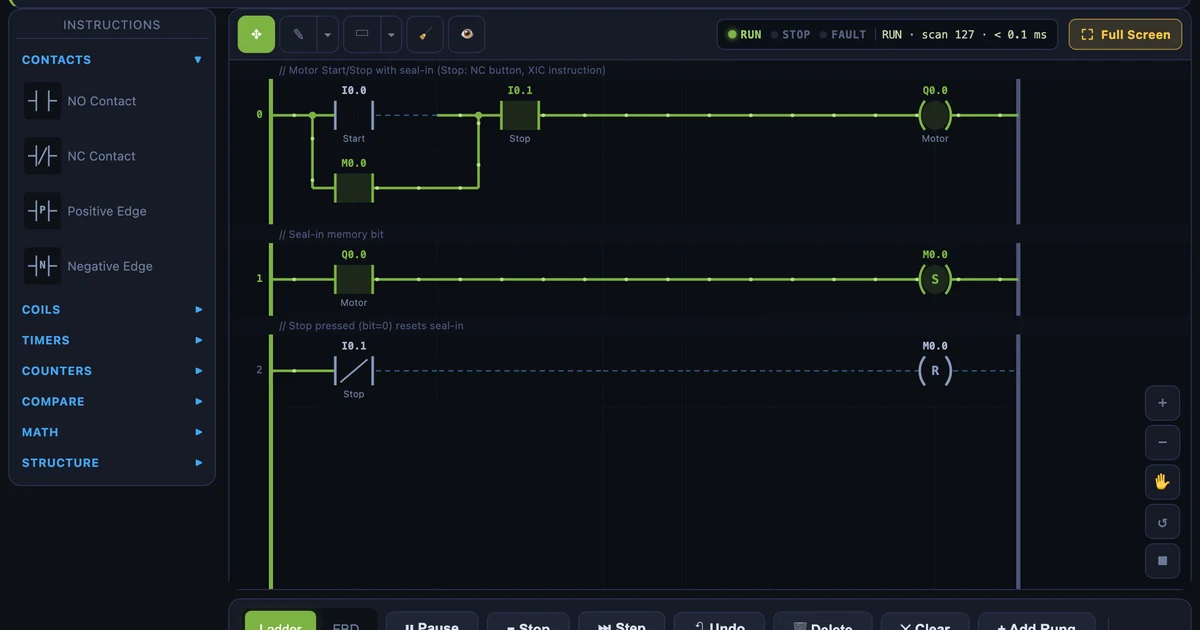
The hero image is the Motor Start/Stop preset. Press I0.0 and coil Q0.0 energises; release it and the motor keeps running because the parallel branch through M0.0 holds the rung true. The Stop button is wired as a physical NC push button and examined with a normally open instruction, which is exactly the fail-safe habit Allen-Bradley programmers write as XIC on a stop input. Set and Reset coils cover OTL/OTU-style latching too.
Timers
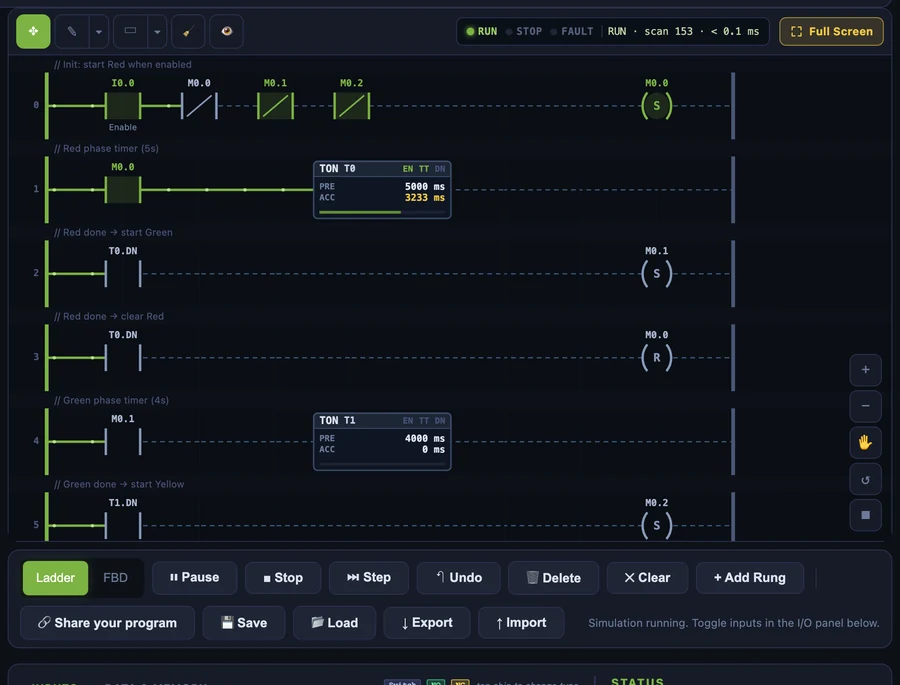
TON, TOF, TP and RTO are all there, each showing PRE, ACC and the EN, TT and DN bits. The Traffic Light preset chains them: red for 5 s, green for 4 s, yellow for 2 s, each timer's DN bit starting the next phase.
Counters, compare and math
CTU, CTD and CTUD counters, six compare instructions (EQU, NEQ, GRT, LES, GEQ, LEQ) and five math instructions (MOV, ADD, SUB, MUL, DIV, with divide-by-zero flagged). The Conveyor Counter preset stops a belt after 10 parts. The Thermostat preset uses GRT D0 > 30 and LES D0 < 20 for hysteresis: open the Data & Memory tab, type a temperature into D0 while it runs, and watch the heater flag flip only outside the 20–30 band.
Function Block Diagram and debugging
Click FBD and most presets redraw as blocks: AND, OR, SR latches, R_TRIG edges, TON timers. Pause freezes the scan with everything held; Step runs one scan at a time; Stop de-energises outputs like a real PLC switched out of RUN. Press Run and the simulator also checks every address and warns when the same coil is written on two rungs.
Where do PLC Fiddle and OpenPLC fit?
They're good tools, and you should know about them. PLC Fiddle is a free browser ladder sandbox, quick for testing a rung. OpenPLC is an open-source PLC stack that runs on hardware from microcontrollers to a Raspberry Pi, so it's the free route if you want real I/O on a bench.
What MechSimulator adds is teaching structure. You get 11 worked programs to pull apart (Motor Start/Stop, Traffic Light, Conveyor Counter, Star-Delta, Tank Level, Bottle Filling, Alarm Latch, Flashing Beacon, Step Sequencer, Thermostat, Bottle Filler), edge contacts, retentive and pulse timers, up/down counters, a live watch table for M bits, D registers, timers and counters, and an FBD view of the same logic. Explore, Practice and Quiz modes turn it into a lesson rather than a blank sheet. Try all three tools; they're free.
When should you switch to the vendor software?
Switch when the vendor's details become the thing you're being assessed on. That means I/O module configuration, tag databases, Allen-Bradley file addressing like N7:0 or Siemens data blocks, communication with an HMI, and the download-and-go-online workflow. None of that exists in a browser simulator, and pretending otherwise would waste your time.
The good news: the logic transfers almost one to one. An NO contact is XIC. An NC contact is XIO. An output coil is OTE. A TON's DN bit behaves the same way in Studio 5000. Students who've spent ten hours debugging seal-in rungs and timer chains open RSLogix and recognise the screen.
A two-week practice plan before your first PLC lab
Days 1–3: relay logic. Load Motor Start/Stop, delete the M0.0 branch and watch the motor drop out the moment Start is released. Rebuild it yourself. If ladder still feels abstract, do the same AND/OR logic as gates in the logic gates simulator first.
Days 4–7: timers. Run the Traffic Light preset in Step mode. Change T0 from 5000 ms to 8000 ms and predict when green starts before you press Run.
Days 8–10: counters and compare. Change the Conveyor Counter preset from 10 parts to 6. Sweep D0 in the Thermostat preset to find both switching points.
Days 11–14: real machines. Build relay logic that drives solenoid valves in the electro-pneumatic circuit simulator, then take the Quiz. Our free FluidSIM alternative guide covers the fluid power side of the same course.
Try It Yourself
All tools below are free — no account, no download.
Key Takeaways
- MechSimulator's PLC Ladder Logic Simulator is a free, browser-based alternative to LogixPro for practising ladder logic: 27 instructions, 11 presets, 8 inputs and 8 outputs.
- LogixPro is being renamed Professor Bill's LadderLab; its vendor lists it as Windows-only with $40 USD keys and animated scenes such as a silo and an elevator.
- RSLogix Emulate 500, Studio 5000 Logix Emulate and S7-PLCSIM run the real vendor instruction sets; no free browser tool downloads to hardware.
- The free simulator uses IEC 61131-3 names and Siemens-style I0.0/Q0.0 addresses; NO maps to XIC, NC to XIO, the coil to OTE.
- Live power flow, Step mode and a Data & Memory watch table make it a debugging trainer, not just an editor.
- Move to the vendor software when hardware configuration, tags and going online are what you're assessed on.
Frequently Asked Questions
What is a free alternative to LogixPro?
MechSimulator's PLC Ladder Logic Simulator is a free, browser-based alternative for practising ladder logic. It has 27 ladder instructions plus 2 branch tools, 11 working preset programs, 8 inputs and 8 outputs, live power-flow highlighting and a Function Block Diagram view, with no download or account. LogixPro (now being renamed Professor Bill's LadderLab) is a paid Windows program with animated I/O scenes such as a door, a silo and a batch mixer.
Is there a free RSLogix simulator?
Rockwell's own emulators, RSLogix Emulate 500 and Studio 5000 Logix Emulate, are licensed software that run the real Logix instruction set. For free practice of the same ideas (XIC and XIO contacts, OTE, latch and unlatch coils, TON, TOF and RTO timers, CTU and CTD counters) you can use a browser simulator such as MechSimulator's PLC Ladder Logic Simulator, which uses IEC 61131-3 names and Siemens-style I0.0 and Q0.0 addresses rather than Allen-Bradley tags.
Can I download a program from the free simulator to a real PLC?
No. The simulator runs entirely in your browser and has no connection to hardware. You can save a program in the browser, export it as a JSON file or PNG image, or copy a share link, but downloading to an Allen-Bradley or Siemens controller needs the vendor's software: RSLogix 500 or Studio 5000 Logix Designer for Rockwell, TIA Portal for Siemens.
Does the simulator work on a Chromebook or a Mac?
Yes. It is a static web page that runs in any modern browser, so it works on Chromebooks, Macs, Windows PCs and tablets without administrator rights. The LogixPro and LadderLab vendor page states that LadderLab runs on Windows PCs only.
How is it different from PLC Fiddle or OpenPLC?
PLC Fiddle is a free browser ladder sandbox and OpenPLC is an open-source PLC runtime and editor that can run on real hardware such as a Raspberry Pi. MechSimulator's simulator sits between them: nothing to install, but it adds 11 worked presets, edge contacts, retentive and pulse timers, up/down counters, compare and math instructions, a live Data and Memory watch table, a full FBD view, and Explore, Practice and Quiz modes for teaching.
Ladder logic is learned by breaking rungs and fixing them, over and over, long before anyone hands you a real controller. The vendor tools are where you'll finish. They don't have to be where you start.
Open the free PLC Ladder Logic Simulator, press Run on Motor Start/Stop, and try to stop the motor without touching the Stop button.