Mohr's Circle Calculator
Principal Stresses • Max Shear • Stress Transformation • Rotation — Simulate • Explore • Practice • Quiz
Display Controls
Σ Live equations — values substituted from current state
↻ Sign conventions — why the circle sometimes turns the other way
💡 What-if coach — insights from current values
⚠ Failure theories — Tresca, Von Mises, Rankine
1 Overview
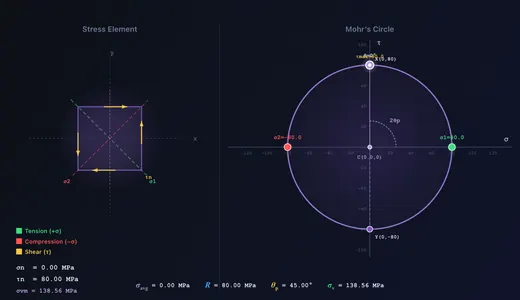
The Mohr’s Circle Simulator is an interactive visualisation tool for 2D plane stress analysis. Define a stress state (σx, σy, τxy) using sliders, number steppers, or by dragging Point X directly on the σ–τ plane. See the corresponding Mohr’s Circle, stress element, principal stresses, max shear, principal angle θp, Von Mises equivalent stress, and the transformed stresses at any angle θ — updated live.
The SI / Imperial switch beside the presets reads the whole stress state in ksi instead of MPa — the unit US texts state plane-stress problems in. The stress inputs, all seven stress readouts, the on-diagram point annotations (C, X, Y, σ1, σ2, τmax), the σ-axis label and its grid ticks all follow, and the ticks are re-chosen so they land on round ksi values rather than converted MPa ones. Angles (θ, θp) are the same in both systems. Explore concepts and Practice problems stay in MPa because they are fixed textbook statements.
A 2:1 angular relationship is the key insight: a rotation of θ on the physical element corresponds to 2θ on the circle. Press Play to auto-animate θ from 0° to 180° and watch the stress element rotate while the point traces a full lap around the circle.
2 Interactive Features

- Build It Step by Step (bottom-left of the canvas) walks through the nine stages of the construction — plot X, plot Y, join the diameter, find C, strike the radius R, read σ1 and σ2, measure 2θp, find τmax, then rotate. Each stage draws only what has been constructed so far and narrates it on the canvas. Page Down / Page Up step through it; Esc exits.
- Drag Point X on the σ–τ plane to set σx and τxy directly. Point Y mirrors automatically.
- Drag the X′ rotation point around the circle to set the element angle in real time. X′ is the same colour as the highlighted x′-face on the element, and Y′ matches the y′-face — the Face → point link toggle turns that colour pairing on and off.
- Jump to buttons snap θ straight to 0°, to θp (watch the shear arrows vanish) or to θp + 45° (maximum shear).
- Play / Pause auto-animates θ; adjust the speed slider 0.2×–2.0×.
- Number steppers next to each slider allow precision entry. + Custom opens a unit-aware modal for values beyond the slider range (up to ±5000 MPa).
- Right-click the canvas for a context menu: Copy values, Export CSV/PNG, Toggle grid, Toggle equation overlay, Toggle 3-D circles, Build it step by step, Reset.
- Keyboard: Arrow keys nudge θ by 1° (Shift+Arrow by 10°, Alt+Arrow by 0.5°); Space toggles play; Ctrl+Z undo, Ctrl+Shift+Z redo; Esc closes modals, the context menu or the construction walkthrough.
- Display controls hide/show the Grid, Principal planes, Max-shear planes, Dimensions & arcs, the canvas equation overlay, the Von Mises readout, the 3-D circles and the Face → point link.
3 Learning Panels & Show Calculations
Below the canvas the Learning panels (Live equations, What-if coach, Failure theories) reveal the math behind every result, rendered in classical mathematical notation with KaTeX. The What-if coach calls out interesting cases: pure shear, biaxial equal stress, principal alignment, and safety margins.
Click Show Calculations (bottom-right of the canvas) to open a step-by-step derivation modal — centre, radius, principal stresses, principal angle, transformed stresses at the current θ, Von Mises, and a real-world context note. Recomputed every time the modal opens.
4 Simulate Mode
Sliders run −200 to +200 MPa for σ (positive = tension, negative = compression) and −150 to +150 MPa for τxy. Use the + Custom button or the number input to enter values up to ±5000 MPa for unusual cases. The centre moves to σavg = (σx + σy) / 2 and the radius becomes R = √[((σx − σy)/2)² + τxy²].
The θ slider runs −90° to +90° in half-degree steps — a full period of the transformation, and wide enough that θp is always reachable even when it is negative. Positive θ is counter-clockwise, matching the transformation equations; the dashed arc on the element shows the direction. The corresponding point traces the circle at 2θ, and the transformed stresses update on the element and in the σn @ θ readout. Set θ = θp and the shear vanishes — the definition of a principal plane.
Stress source — where the state comes from
Real problems rarely hand you σx, σy and τxy. The Stress source selector derives them from a load case, and the sliders then follow the loading instead of being typed:
| Source | Inputs | Stress state |
|---|---|---|
| Bar in axial load | F, d | σx = F/A, A = πd²/4 |
| Solid shaft in torsion | T, d | τ = 16T/(πd³) — pure shear |
| Shaft: bending + torsion | M, T, d | σx = 32M/(πd³), τ = 16T/(πd³) |
| Beam element (b × h) | M, V, b, h, y | σx = My/I, τ = VQ/(Ib), I = bh³/12 |
| Thin cylinder under pressure | p, D, t | σhoop = pD/2t, σaxial = pD/4t |
Set the beam’s y to ±h/2 and the shear disappears while σ peaks; set it to 0 and the reverse happens — the two classical extremes, on one circle.
Material and failure checks
The Material selector carries seven published materials (S275, A36, 4140, 304, 6061-T6, Ti-6Al-4V and grey cast iron class 30) plus a Custom entry where you type σY, σUT and σUC. Every criterion in the Failure-theories panel, the governing factor-of-safety readout card and the What-if coach follow it. Choose cast iron and the governing criterion switches from von Mises to Rankine, because a brittle material fails on σ1, not on distortion energy.
τ-axis convention
The τ-axis convention toggle switches between plotting τ positive downward (Hibbeler, Beer & Johnston — the element and the circle then turn the same way) and positive upward (pure-maths axes — the circle turns the opposite way). Every number is identical in both; only the picture is mirrored. If your lecturer’s diagrams never seem to match, this toggle is usually why.
5 Explore, Practice & Quiz
Explore opens 12 concepts in three categories — Stress Basics, Mohr’s Circle, Applications — each with its own drawn diagram and a worked example. The diagrams are not decoration: the Rotation concept shows the element’s θ arc beside the circle’s 2θ arc, Absolute Max Shear draws all three circles for a vessel-like state, and Failure & Factor of Safety plots the von Mises ellipse and Tresca hexagon in σ1–σ2 space with your current state marked on it.
Practice generates 15 kinds of random problem — including the absolute-max-shear trap and a shaft under combined bending and torsion — and draws the actual element and circle for the problem, with a ? where the answer goes. Enter your answer for a step-by-step solution, or press Open in Simulate to load that stress state into the main simulator and check it on the circle yourself. Quiz presents 5 randomised questions drawn from a pool of 21 (multiple-choice + numeric); your final score is shown with per-question feedback.
6 Export & Tips
- Export CSV downloads the current stress state, all three principal stresses, both maximum shears, von Mises, the Tresca stress, the material and the governing factor of safety — plus the load-case inputs when a stress source is active.
- τmax is reported twice — in-plane (= R) and absolute (over σ1, σ2 and σ3 = 0). Use the absolute value for Tresca.
- Export PNG downloads a snapshot of the canvas with a MechSimulator watermark.
- Remember the 2:1 rule: a physical rotation of θ corresponds to 2θ on Mohr’s Circle.
- τmax = R = (σ1 − σ2) / 2 always.
- For pure shear (σx = σy = 0), σ1 = +τxy and σ2 = −τxy.
- For biaxial equal stress (σx = σy, τxy = 0) the in-plane circle collapses to a point — but σ3 = 0 still gives τabs = σ/2, so a ductile metal does still yield at σ = σY. Only true 3-D hydrostatic stress cannot yield it.
- Use σv = √(σ1² − σ1·σ2 + σ2²) and the Failure-theories learning panel to check ductile yielding.
Mohr's Circle — Stress Analysis and Transformation
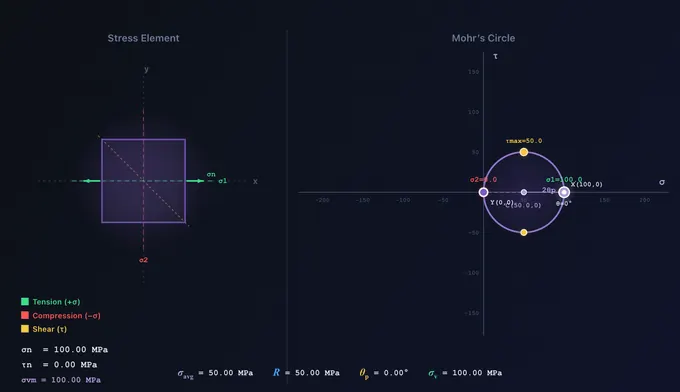
Mohr's Circle is one of the most important graphical tools in mechanics of materials. Developed by Christian Otto Mohr in 1882, it provides a graphical method for determining principal stresses, maximum shear stress, and stress transformation at a point under plane stress. By plotting normal stress (σ) on the horizontal axis and shear stress (τ) on the vertical axis, engineers can instantly visualise how stresses transform as the orientation of the plane changes. This simulator lets you explore Mohr's Circle interactively — dragging Point X on the σ–τ plane, animating the rotation angle θ, and watching the stress element and the corresponding point on the circle update simultaneously.
Understanding Plane Stress and the Stress Element
In plane stress analysis, we consider a thin element where all stresses act in one plane. The state of stress at a point is defined by three components: the normal stress σx acting in the x-direction, the normal stress σy acting in the y-direction, and the shear stress τxy acting on the x- and y-faces. A positive normal stress indicates tension (pulling the element apart), while a negative value indicates compression. The stress element is a small square drawn at the material point showing all these stress components with arrows on each face. When the element is rotated by an angle θ, the stress components transform according to the stress transformation equations, and Mohr's Circle provides a graphical representation of these equations.
Constructing Mohr's Circle
To construct Mohr's Circle: (1) Plot point X = (σx, τxy) and point Y = (σy, −τxy). (2) Connect X and Y with a straight line — this is the diameter of the circle. (3) The centre of the circle is at (σavg, 0) where σavg = (σx + σy) / 2. (4) The radius of the circle is R = √(((σx − σy) / 2)² + τxy²). The rightmost point on the σ-axis gives the maximum principal stress σ1 = σavg + R, and the leftmost gives the minimum principal stress σ2 = σavg − R. The top and bottom of the circle give the maximum shear stress τmax = R.
Stress Transformation Equations
The transformed normal stress on an inclined plane at angle θ is given by σn = σavg + R · cos(2θ − 2θp), and the transformed shear stress is τn = R · sin(2θ − 2θp). As θ varies from 0° to 180°, the point on the circle travels a full 360°. This 2:1 relationship between the rotation on the physical element and the angle on Mohr's Circle is a fundamental property — press Play in the simulator to watch it animate.
Applications in Engineering Design
Mohr's Circle is widely used in structural, mechanical, and aerospace engineering for failure analysis and design. The Von Mises equivalent stress σv = √(σ1² − σ1·σ2 + σ2²) is derived from principal stresses obtained via Mohr's Circle and is compared against the material yield strength to determine whether yielding occurs. Engineers use Mohr's Circle in pressure vessels, shafts under combined loading, welded joints, and composite materials. The Show-Calculations modal in this simulator walks through each step in classical mathematical notation.
Key Formulas at a Glance
For quick reference, the essential Mohr's Circle formulas are: Centre: σavg = (σx + σy) / 2. Radius: R = √(((σx − σy) / 2)² + τxy²). Principal stresses: σ1 = σavg + R, σ2 = σavg − R. Maximum shear: τmax = R = (σ1 − σ2) / 2. Principal angle: θp = ½ · arctan(2τxy / (σx − σy)). Transformation: σn = σavg + R·cos(2θ − 2θp), τn = R·sin(2θ − 2θp). Von Mises: σv = √(σ1² − σ1·σ2 + σ2²).
Failure Theories and Mohr's Circle
Mohr's Circle provides the principal stresses needed for all major failure theories. The Maximum Normal Stress Theory (Rankine) predicts failure when σ1 exceeds the ultimate tensile strength — applicable to brittle materials. The Maximum Shear Stress Theory (Tresca) predicts yielding when τmax exceeds the shear yield strength — slightly conservative for ductile metals. The Distortion Energy Theory (Von Mises) is the most accurate for ductile materials. The Failure-theories learning panel below applies all three to the current stress state with a colour-coded safety summary.
Worked Example — A Plane Stress Element Solved End-to-End
Take an element with σx = 80 MPa, σy = −30 MPa, τxy = 40 MPa. Plug these into the simulator and walk the circle:
| Step | Formula | Working | Result |
|---|---|---|---|
| Centre of circle (average normal stress) | C = (σx+σy)/2 | (80−30)/2 | 25 MPa |
| Half-range of normal stresses | (σx−σy)/2 | (80−(−30))/2 | 55 MPa |
| Radius of circle | R = √[55² + 40²] | √(3025+1600) = √4625 | 68.0 MPa |
| Maximum principal stress σ1 | C + R | 25 + 68 | 93.0 MPa |
| Minimum principal stress σ2 | C − R | 25 − 68 | −43.0 MPa |
| Principal angle θp | ½·atan(2τxy/(σx−σy)) | ½·atan(80/110) = ½·36.0° | 18.0° |
| Maximum in-plane shear stress | τmax = R | — | 68.0 MPa (at 45° from θp) |
Read the simulator’s rotated-element overlay to verify visually: rotate the element by 18° and the shear traction disappears (only normal stresses remain); rotate it by 63° (= 18 + 45) and the shear traction reaches its maximum.
Reading the Circle — What Each Point Means Physically
The Mohr’s circle is more than a calculation aid; every point on it corresponds to a physical face of the same material element rotated by some angle:
- Centre C — the hydrostatic (volume-changing) component of the stress. Shifts the whole circle horizontally; does not affect failure of ductile materials, which respond to the deviatoric (distortion) component.
- Radius R — the maximum shear stress on any plane in the x–y plane. R = 0 means the in-plane state is equal-biaxial; it does not mean the point is safe, because σ3 = 0 gives an out-of-plane circle of radius σ/2. Only genuine three-dimensional hydrostatic stress (σ1 = σ2 = σ3) produces no shear on any plane at all — deep-water rock far below failure.
- Top or bottom of the circle — the plane carrying the maximum in-plane shear, τ = R, with normal stress σavg (never zero). Which of the two is +τ depends on the plotting convention; the simulator’s τ-axis toggle labels it either way.
- Rightmost point — the principal plane carrying σ1; zero shear here, so this is the plane on which a brittle crack is most likely to open.
- Angle on the circle = 2× angle in physical space. If you rotate the physical element by 18°, the corresponding point moves 36° around the circle. This factor of two trips up almost every student; remembering it is the key insight.
When 2D Mohr’s Circle Is Not Enough — The 3D Extension
Plane stress assumes the out-of-plane direction carries zero stress. That works for thin sheets, beams in bending, and the surface of pressurised pipes — but breaks for thick pressure vessels, deeply embedded bolts, and any state where all three principal stresses are non-trivial. In 3D, three principal stresses σ1 ≥ σ2 ≥ σ3 define three circles, one for each pair, plotted on the same σ−τ axes.
The true maximum shear stress is then:
τmax,3D = (σ1 − σ3) / 2
Critical example: a thin-walled pressure vessel under internal pressure has in-plane principal stresses of hoop σh and axial σa = σh/2; both positive. The 2D Mohr’s circle gives τmax,2D = (σh − σa)/2 = σh/4. But the third principal stress (radial through the wall) is σ3 ≈ −p ≈ 0 (or slightly negative). The true τmax,3D = (σh − 0)/2 = σh/2 — twice the 2D answer. A vessel designed on 2D Mohr’s circle alone would be undersized for shear-controlled (Tresca) failure.
A Real Case — Diagnosing a Fillet-Weld Crack with Mohr’s Circle
A fillet weld attaching a bracket to a column transfers a vertical load 80 mm out from the column face. Hand-calculate the stress state at the weld root for an applied load of 12 kN on a 6 mm-throat, 100 mm-long weld:
- Direct shear from the load: τ = F / (throat × length) = 12000/(6·100) = 20 MPa.
- Bending stress from the 80 mm eccentricity: M = 12·0.08 = 0.96 kN·m. Z (weld) ≈ 6·100²/6 = 10000 mm³. σ = M/Z = 0.96×10⁶/10000 = 96 MPa (tensile at the top of the weld).
- Plug σx = 96, σy = 0, τxy = 20 into the simulator: σ1 = 100.1 MPa, σ2 = −4.1 MPa, τmax = 52.1 MPa, principal angle θp = 11.3° from the weld axis.
- Crack orientation: brittle weld cracks open perpendicular to σ1. The simulator predicts a crack starting at the weld root and propagating at 11.3° to the column face — matching the typical 10−15° angle observed in failed bracket welds. A picture of the cracked weld would show this slant tellingly.
Why Does My Mohr’s Circle Rotate the Wrong Way? Sign Conventions Explained
This is the single most common source of confusion, and it is not a mistake in your working — it is a difference of convention. The transformation equations always take θ positive counter-clockwise from the x-axis. What differs between textbooks is which way the τ axis points on the plot:
- τ positive downward (Hibbeler; Beer & Johnston). Rotate the physical element counter-clockwise by θ, and the point runs counter-clockwise round the circle by 2θ — the same sense. This is why those books draw the axis that way: it removes a mental flip.
- τ positive upward (the ordinary mathematical axes). The same counter-clockwise rotation of the element now sends the point clockwise by 2θ.
Every number — σ1, σ2, τmax, θp — is identical either way. Only the drawing is mirrored about the σ-axis. The simulator carries a τ-axis toggle so you can flip between the two and watch the animation reverse while every readout stays put; the Sign-conventions learning panel states the consequence of whichever one is active. A second convention to keep straight: point X is the face whose normal points along x, and it plots at (σx, τxy); point Y is at (σy, −τxy). The sign flip is what makes X and Y diametrically opposite, which is the graphical statement that the two faces sit 90° apart in the material.
From Load to Circle — A Shaft Under Combined Bending and Torsion
Examination problems usually give you a component and a loading, not a stress state. Take a solid shaft of diameter d = 30 mm carrying a bending moment M = 250 N·m and a torque T = 300 N·m. At the top surface fibre:
| Step | Formula | Working | Result |
|---|---|---|---|
| Bending stress along the axis | σx = 32M/(πd³) | 32 × 250 000 / (π × 30³) | 94.3 MPa |
| Hoop direction is unloaded | σy | — | 0 |
| Torsional shear at the surface | τ = 16T/(πd³) | 16 × 300 000 / (π × 30³) | 56.6 MPa |
| Centre of the circle | σavg = σx/2 | 94.3 / 2 | 47.2 MPa |
| Radius | R = √[(σx/2)² + τ²] | √(2224 + 3202) | 73.7 MPa |
| Principal stresses | σ1,2 = σavg ± R | 47.2 ± 73.7 | 120.8 and −26.5 MPa |
| Principal angle | θp = ½·atan2(2τ, σx) | ½ × 50.2° | 25.1° |
Choose Shaft: bending + torsion in the simulator’s Stress source selector, type the three numbers, and the circle is built for you — with the schematic of the shaft drawn beside the element so it is clear which fibre is being analysed. Because σ1 and σ2 have opposite signs here, the in-plane circle is also the largest of the three, so τmax = R = 73.7 MPa is the true maximum shear. Swap the source to Thin cylinder under pressure and that is no longer true, which is exactly the point of the 3-D circles toggle.
Selected References
- Hibbeler, R. C. — Mechanics of Materials, 10th ed., Pearson, Chapter 9 (Stress Transformation). The canonical undergraduate reference.
- Boresi, A. P., Schmidt, R. J. — Advanced Mechanics of Materials, 6th ed., Wiley, for the 3D extension.
- ASME BPVC Section VIII Division 2 — Alternative Rules for Construction of Pressure Vessels, which uses Mohr’s 3D principal stresses in its stress-intensity assessment.
- Eurocode 3 (EN 1993-1-1) — the European steel-structures code, which references Tresca and von Mises criteria computed from Mohr’s principal stresses for weld and bolt verification.
Mohr’s Circle Formulas — 2D Stress Transformation
| Parameter | Formula | Description |
|---|---|---|
| Centre of Circle | C = (σx + σy) / 2 | Average normal stress |
| Radius of Circle | R = √[((σx−σy)/2)² + τxy²] | Half-range of principal stresses |
| Maximum Principal Stress | σ1 = C + R | Largest normal stress on any plane |
| Minimum Principal Stress | σ2 = C − R | Smallest normal stress on any plane |
| Maximum In-Plane Shear | τmax = R = (σ1−σ2)/2 | Occurs at 45° to the principal planes; normal stress there is σavg |
| Absolute Maximum Shear | τabs = (σmax−σmin)/2 over {σ1, σ2, 0} | Larger than R whenever σ1 and σ2 share a sign |
| Tresca Equivalent Stress | σmax − σmin | Compare with σY; must include σ3 = 0 |
| Von Mises Equivalent Stress | σv = √(σ1² − σ1σ2 + σ2²) | Distortion-energy criterion for ductile metals |
| Principal Angle | 2θp = arctan(2τxy / (σx−σy)) | Orientation of principal planes |
Explore Related Simulators
If you found this Mohr’s Circle simulator helpful, explore our Thin-Walled Pressure Vessel simulator, Stress–Strain Curve simulator, Beam Bending simulator, and Shaft Torsion simulator for more hands-on practice.
Updated
Values are read in the unit system currently on screen (range ±5000 MPa). Useful for cases beyond the slider limits.