Drilling Machine Simulator
Parts Identification • Drilling Operation • Cutting Parameters — Simulate • Explore • Practice • Quiz
| # | Question | Result |
|---|
1 Overview
The Metric / Imperial switch in the mode bar restates the job in US drilling units: surface speed in SFM, feed in in/rev, drill diameter, hole depth and table height in inches, metal removal rate in in³/min, power in hp, torque in lbf·in, thrust in lbf and finish in microinch Ra. The graph badges, the operation header, the penetration and gap callouts and the thrust-force label convert with it. Spindle speed stays in RPM and machining time in seconds.
The Drilling Machine Simulator is a virtual column drill press that lets you perform drilling operations on different materials while calculating all key cutting parameters. A drilling machine creates round holes using a rotating drill bit pressed into the workpiece. This simulator teaches you the machine's major components, how to select proper cutting speeds and feeds, and how parameters like drill diameter, spindle speed, and feed rate affect MRR, power, torque, thrust force, surface roughness, and machining time.
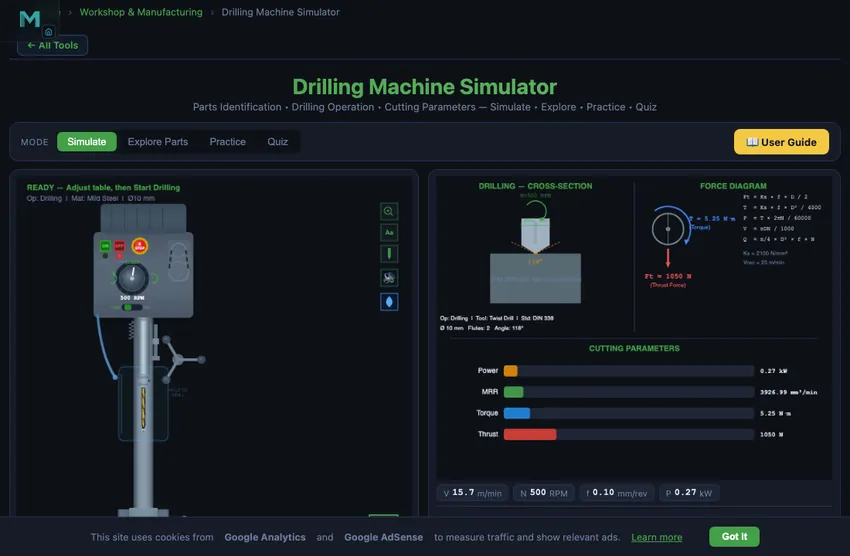
The dual-canvas layout shows the drill press with animated spindle rotation and feed motion on the left, and cutting parameter diagrams with force vectors on the right. The control panel lets you select the drilling operation type, workpiece material, and adjust spindle speed, feed rate, drill diameter, and hole depth.
2 Setting Up the Job

The simulator opens in Simulate mode. The left canvas displays the drilling machine with labeled parts. Graph badges show cutting speed, RPM, feed rate, and power in real time. The control panel provides operation type selection, material selection, and sliders for spindle speed, feed rate per revolution, drill diameter, and hole depth.
To drill your first hole: (1) Select the operation type (e.g., standard drilling). (2) Choose a material. (3) Set the spindle speed, feed rate, drill diameter, and hole depth using the sliders. (4) Click "Start Drilling" to watch the animated drilling sequence. The drill bit rotates, feeds into the workpiece, and chips spiral out of the hole. (5) Read the eight calculated results in the readout grid. Click "Reset" to prepare for the next hole.
3 Running the Operation
The left canvas animates the drill press operation, showing the spindle rotating at the set RPM while the quill feeds the drill bit into the workpiece at the specified feed rate. Chip spirals emerge from the hole as material is removed. The right canvas displays cutting parameter diagrams and force vectors showing the thrust force pushing the drill into the workpiece and the torque resisting rotation.
The readout grid shows eight results: Cutting Speed (m/min), Feed Rate (mm/rev), MRR (mm^3/min), Power Required (kW), Torque (N m), Thrust Force (N), Surface Roughness (micrometers Ra), and Machining Time (seconds). The cutting speed is calculated at the drill periphery as V = pi D N / 1000. Thrust force and torque are critical for selecting the right drill press and clamping the workpiece securely.
4 Speeds, Feeds & Theory
The Explore Parts mode provides an interactive identification guide to all drill press components. Categories cover the base, column, table (height adjustable), head assembly (motor, belts, spindle), drill chuck, quill and feed mechanism, and speed selection controls. Click any component to highlight it on the canvas and read its function and specifications.
Additional topics include types of drilling machines (sensitive, upright, radial, gang, multi-spindle), drill bit geometry (point angle, lip relief, helix angle, chisel edge), drilling-related operations (reaming, boring, counterboring, countersinking, tapping), and cutting fluid selection. This comprehensive reference prepares you for both practical workshop skills and written examinations.
5 Try a Problem
Practice mode generates drilling calculation problems. You might need to calculate the correct RPM for a given drill diameter and cutting speed, determine the machining time for a specific hole depth, compute the MRR, or find the required power. Enter your numerical answer and check it. Step-by-step solutions show the complete calculation method.
Quiz mode presents five questions per session covering parts identification, operation selection, and numerical calculations. Questions might ask you to identify a drill press component, choose the correct operation for a given task, or calculate thrust force from cutting parameters. Review your results and retake to improve.
6 The 3D Drill Press
The 2D | 3D switch at the bottom left of the machine view turns the side drawing into a 3D pillar drill at true size. It opens in 3D on a computer or tablet and in 2D on a phone. It is the same machine: the drill, the stock, the quill stroke and the table travel are the millimetres the 2D drawing uses, and every number on it comes from the same calculation as the readouts.
Operate it with its own controls. Press the green I button to start the spindle and the red O button to stop it, or the mushroom emergency stop (press again to release). Click the right half of the speed knob for +50 rpm and the left half for −50 rpm; the red display shows the speed. Set the direction selector to F or R. In Manual, press and hold the feed handle to drill: the quill feeds at the set feed rate and springs back up when you let go. Drag the table (or the vice) up or down, or turn the elevating crank (one turn = 4 mm), to set the table height; it stops where the work would hit the drill. Click the drill to change the bit (spindle off), the vice to change the work, the belt guard to open it and see the step pulleys and V-belt, and the coolant base to switch the coolant.
See inside the cut. Section cuts the vice and the plate through the drill axis, as the 2D picture does, so you can watch the hole being cut. Forces shows the thrust and torque at the drill while it cuts, Labels names the nineteen parts and Data shows the cutting-data plate. The Auto camera shows the whole machine while it waits and closes in on the drill while it cuts. You can also pick Machine, Operator, Side (as 2D), Drill & work, Controls or Top. Drag to look around, use the right button or Shift and drag to pan, and pinch or Ctrl + scroll to zoom.
7 Shop Tips
- The key formula for drilling is V = pi D N / 1000. Rearrange to N = 1000 V / (pi D) when you know the recommended cutting speed for a material.
- Feed rate in drilling is per revolution (mm/rev), not per minute. Table feed rate (mm/min) = f x N.
- MRR for drilling = pi D^2 f N / (4 x 1000), since the full drill diameter is the hole width.
- Thrust force increases with feed rate and drill diameter. Always ensure the workpiece is properly clamped to resist thrust force.
- For softer materials like aluminum, you can use higher cutting speeds (80-100 m/min) and feed rates. For harder materials like stainless steel, reduce speed significantly (8-15 m/min).
- Use Explore Parts mode to learn all components before attempting the quiz, as visual identification questions are common in exams.
- In Practice mode, always check the units. Feed rate in drilling is typically mm/rev, while machining time needs the total feed in mm/min divided into the hole depth.
What is a Drilling Machine?
A drilling machine (drill press) is one of the most essential machine tools in any workshop. It creates round holes in workpieces using a rotating cutting tool called a drill bit. The machine consists of a base, column, table, spindle, and head assembly with motor and drive mechanism. Understanding each part and its function is fundamental for mechanical engineering students.
This simulator lets you identify all major parts of a column drilling machine, operate the controls interactively, and calculate cutting parameters including cutting speed (V = πDN/1000), feed rate, material removal rate (MRR), power consumption, torque, and thrust force in real time.
Parts of a Drilling Machine and Their Functions
A column drilling machine is built from five groups of parts. The simulator's Explore Parts mode lets you click any of the 18 components below and see it highlighted on the machine; the same list is reproduced here for reference and revision.
Structure
| Part | Function |
|---|---|
| Base | Heavy cast iron foundation that supports the entire machine. Has T-slots for clamping workpieces directly and provides stability during drilling operations. |
| Column | Vertical precision-machined cylindrical pillar. Guides the table and head assembly, maintaining alignment between the spindle and work surface. |
| Table | Adjustable work surface with T-slots for clamping fixtures and vises. Can be raised, lowered, and swiveled around the column to accommodate different workpiece sizes. |
| Table Clamp | Locking mechanism that secures the table at the desired height on the column. Must be tightened firmly before drilling to prevent table movement under cutting forces. |
Drive System
| Part | Function |
|---|---|
| Head Assembly | Houses the motor, V-belt drive, spindle bearings, and speed change mechanism. Mounted at the top of the column and contains all the power transmission components. |
| Motor | Electric induction motor (typically 0.5 to 3 HP) that provides rotary power to the spindle through a belt drive system. Speed is typically 1440 or 2880 RPM. |
| Spindle | Hollow rotating shaft that transmits torque to the cutting tool. Has a Morse taper bore at the lower end for mounting drill chucks or taper-shank tools directly. |
| Speed Selector | Step pulley system or variable speed dial for changing spindle RPM. Step pulleys provide 4-6 discrete speeds by moving the V-belt between different diameter pulleys. |
Feed Mechanism
| Part | Function |
|---|---|
| Quill | Non-rotating sleeve that holds the spindle. Moves vertically up and down to provide the feed motion. Returned to top position by the return spring after each drilling cycle. |
| Feed Handle | Three-spoke handle for manual downward feed of the quill and spindle. The operator controls feed rate and feel through this handle, sensing cutting resistance. |
| Depth Stop | Adjustable rod and nut mechanism that limits the maximum depth of quill travel. Essential for drilling blind holes to precise depths and preventing table damage. |
| Return Spring | Coil spring inside the head assembly that automatically returns the quill and spindle to the top position when the feed handle is released after drilling. |
Work Holding
| Part | Function |
|---|---|
| Chuck | Three-jaw drill chuck that grips parallel-shank drill bits concentrically. Tightened with a chuck key. Available in sizes from 6 mm to 16 mm capacity. |
| Drill Bit | HSS or carbide twist drill with two helical flutes for chip evacuation. Standard point angle is 118 ° with a chisel edge at the center. The primary cutting tool. |
| Worktable Vice | Machine vice bolted to the table T-slots. Holds workpieces firmly with parallel jaws. Must be properly aligned so the drill enters perpendicular to the workpiece surface. |
Safety
| Part | Function |
|---|---|
| Power Switch | ON/OFF switch with emergency stop capability (typically a mushroom-head push button). Should be easily accessible to the operator for quick shutdown in emergencies. |
| Guard | Transparent polycarbonate safety shield around the chuck and drill bit area. Prevents chips and broken drill bits from injuring the operator. Must be in place during operation. |
| Coolant System | Pump, flexible nozzle, and reservoir for delivering cutting fluid to the drill point. Reduces heat, improves surface finish, extends tool life, and helps evacuate chips. |
Types of Drilling Machine
The same machine goes by different names depending on where you trained. A British or Indian workshop calls a floor-standing model a pillar drill or pedestal drill; an American one calls it an upright drill press. A small bench-mounted unit is a bench drill or sensitive drill — “sensitive” because the operator feeds it by hand and can feel the cut through the handle.
| Type | Also called | Typical capacity | Best for |
|---|---|---|---|
| Sensitive / bench drill | Bench drill, bench pillar drill | Up to 13 mm | Small holes, light sheet and bar work; hand feed only |
| Upright / column drill | Pillar drill, pedestal drill, floor drill | 13–50 mm | General workshop work — the type this simulator models |
| Radial drill | Radial arm drill | 50–100 mm | Large or heavy workpieces that cannot be moved under the spindle |
| Gang drill | Multi-head drill | Varies | Sequential operations — drill, ream, countersink, tap without re-fixturing |
| Multi-spindle drill | Multiple-spindle head | Varies | Drilling many holes in one pass on production work |
| CNC drill | CNC drilling centre | Varies | Programmed hole patterns, automatic peck cycles (G83) |
| Deep hole drill | Gun drill | Depth > 10×D | Oil holes, gun barrels; uses through-tool coolant |
This simulator models the upright column drill press — the pillar drill you will find in almost every teaching workshop — because its parts and controls are the ones every other type is built from.
Drilling Machine Operations
A drill press does far more than make round holes. The six operations below are the ones the simulator performs — select any of them and the cross-section view shows the tool and the hole profile it produces. Each needs its own speed and feed, because the cutting conditions are not the same.
| Operation | What it does | Tool | Speed vs. drilling | Feed vs. drilling |
|---|---|---|---|---|
| Drilling | Makes the original hole in solid material | Twist drill | Reference | Reference |
| Reaming | Finishes an existing hole to precise size and surface finish | Machine reamer | About ⅓ — a reamer removes little metal and dulls fast if run fast | Roughly 2× — a reamer must cut, not rub |
| Boring | Enlarges and trues an existing hole to an exact diameter | Single-point boring bar | Reduced | Light |
| Counterboring | Cuts a flat-bottomed recess so a cap-screw head sits flush | Counterbore with pilot | Reduced | Light — the wide flat face cuts on its whole width |
| Countersinking | Cuts a conical recess for a flat-head screw (90° is standard for metric) | Countersink | Well reduced — countersinks chatter easily | Light |
| Tapping | Cuts an internal thread in a drilled hole | Machine tap | Low, and the spindle must reverse to withdraw | Set by the thread pitch, not chosen |
Order matters. Counterboring, countersinking and tapping all need a hole to work in, so drill first — and for tapping, drill the correct tap drill size, not the thread size. Reaming after drilling is what turns a rough ±0.1 mm drilled hole into an H7 fit.
Speed and Feed for a 10 mm Drill in Mild Steel
The single most common workshop calculation. You are drilling a 10 mm through-hole in 25 mm mild steel with an HSS twist drill. Picking parameters:
| Step | Working | Result |
|---|---|---|
| Cutting speed for HSS in mild steel | Vc = 30 m/min (handbook value) | — |
| Spindle RPM | N = 1000·Vc/(πD) = 1000×30/(π×10) | N = 955 rpm |
| Round to typical drill press step | (common steps: 600, 800, 1000, 1200 rpm) | 1000 rpm |
| Feed per revolution (handbook) | f = 0.20 mm/rev for mild steel with HSS | — |
| Feed rate | Vf = N × f = 1000 × 0.20 | 200 mm/min |
| Material removal rate | MRR = Vf × πD²/4 = 200 × 78.5 | 15,700 mm³/min |
| Time for through-hole (25 mm) | t = depth/Vf = 25/200 | 7.5 seconds |
Real-world adjustments: with cutting fluid, you can push the feed to 0.25−0.30 mm/rev. Without coolant, drop to 0.15 to keep the drill from overheating. With carbide drills, multiply the cutting speed by 3 and you can go to 0.4−0.6 mm/rev feed — same hole in 2 seconds. The trade-off is carbide cost.
Peck Drilling — The Trick for Deep Holes
Above about 4× the drill diameter in depth, chip evacuation becomes the limiting factor. The drill cannot push chips up the long flutes; they pack at the cutting edge, heat the drill, and break it. The solution is peck drilling: drill a small distance, retract fully to clear chips, drill a bit more, retract again, repeat. Modern CNC drilling cycles (G83) automate this; manual drilling does it by hand.
Typical peck depth is 0.5× to 1× the drill diameter. So for our 10 mm drill, peck about 5−10 mm at a time. The drilling time roughly doubles but the drill life triples. For aluminium and copper, peck is rarely needed (chips flow well). For tough steels (4340, stainless 17-4 PH) and cast iron, peck is mandatory for any hole deeper than 3×D.
Five Common Drilling Mistakes
- Workpiece not clamped. The drill grabs and spins the workpiece into a sharp metal fan. Always clamp.
- Centre punch skipped. The drill walks across the surface before finding its spot. Centre-punch the hole location first — even on a small workpiece.
- Too slow on aluminium. Aluminium needs about 3× the cutting speed of mild steel. Drilling too slow leaves built-up edges on the drill, awful finish, and wandering holes.
- Wrong drill grind for the material. Standard 118° point angle works for general steel. For brass and copper, use a flat (90°) grind to prevent grabbing. For stainless, use 130° with a thinned web.
- Skipping the through-hole backing block. The drill breaks through and tears the underside finish. A piece of scrap wood under the workpiece eliminates this.
3D Drilling Machine Simulator — Operate a Pillar Drill
On a computer or tablet the drilling machine simulator opens as a 3D pillar drill; on a phone it opens in the 2D side view, and the 2D | 3D switch at the bottom left of the machine view changes it at any time. It runs free in the browser, with no download or sign-up. The 3D machine is the one the 2D drawing shows, at true size: the drill, the stock, the quill stroke and the table travel are the same millimetres, and every number on it comes from the same calculation as the readouts.
You operate it with its own controls, as on a workshop drill press. The green I button starts the spindle, the red O button stops it, and the mushroom emergency stop latches until it is pressed again. Click the speed knob for ±50 rpm, set the direction selector to F or R, then press and hold the feed handle to drill: the quill feeds at the set feed rate and springs back when you let go. Turn the elevating crank (one turn raises the table 4 mm) or drag the table to set the height; it stops where the work would hit the drill. Open the belt guard to see the step pulleys and V-belt, and turn on Section to cut the vice and plate through the drill axis and watch the hole being cut by the twist drill’s 118° point.
Other machine tools with an operable 3D view: the 3D lathe machine simulator and, for measuring the hole afterwards, the 3D vernier caliper.
Explore Related Simulators
If you found this Drilling Machine simulator helpful, explore our Lathe Machine simulator, Micrometer Screw Gauge simulator, Vernier Caliper simulator, the Tap Drill Size Chart, and Thread Nomenclature trainer for more hands-on practice. To drive the same holes from a program rather than the quill, the CNC G-Code Simulator runs the G81, G83 and G73 drilling cycles and counts the holes each one produces.
Updated