Lathe Machine Simulator
Parts Identification • Turning, Facing, Threading • Cutting Parameters — Simulate • Explore • Practice • Quiz

Find a part on the machine
| # | Question | Result |
|---|
1 Overview
The Metric / Imperial switch in the mode bar restates the job in US turning units: surface speed in SFM, feed in in/rev, depth of cut and diameters in inches, metal removal rate in in³/min, power in hp, cutting force in lbf and finish in microinch Ra. The readings, the canvas plates, Detail A and the Analysis view's forces and bars convert with it. Spindle speed stays in RPM and machining time in seconds. The overspeed and overload warnings still trigger on the underlying metric limits, so a card highlights at the same real condition in either system.
The Lathe Machine Simulator is a virtual centre lathe that lets you perform turning, facing, boring, threading, and taper turning operations on different materials. The lathe is called the "mother of all machines" because of its versatility in producing cylindrical surfaces. This simulator teaches you how each lathe component works, how to set cutting parameters, and how those parameters affect material removal rate, cutting force, power consumption, surface roughness, and machining time.
The simulator supports multiple operations and materials, with real-time calculation of cutting speed (V = pi D N / 1000), feed rate, depth of cut, MRR, power, cutting force, surface roughness, and machining time. The dual-canvas layout shows the lathe machine with animated workpiece rotation and chip removal on the left, and cutting parameter diagrams on the right.
2 Setting Up the Job

The simulator opens in Simulate mode as one workstation. The large canvas shows the centre lathe from the operator's side, drawn to scale, with a magnified Detail A of the cut seen from above. The switch on its toolbar changes it to Analysis: the section at the tool seen from the tailstock, the forces on the tool, and the cut against its limits (V toggles the view). The toolbar also holds Power, spindle Forward/Reverse, Coolant, Guard, Light and the E-STOP. The Set up the cut panel beside it holds the operation, the material and the six sliders. START and RESET sit under the canvas with the eight readings.
To perform your first operation: (1) Select an operation (e.g., Turning). (2) Choose a material. (3) Set the spindle speed, feed rate, depth of cut, and workpiece diameter using the sliders. (4) Click "Start Machining" (or press Space) to begin the operation. The tool feeds at the real rate f×N, so a pass lasts exactly the Machining Time shown; long passes are sped up by a factor printed on the canvas. Press Space again to pause, and "Reset" (or R) to begin a new pass.
3 Running the Operation
In Simulate mode, the left canvas animates the lathe operation. For turning, you see the workpiece spinning in the chuck while the cutting tool feeds along its length, reducing the diameter. For facing, the tool moves radially across the end face. For threading, the carriage engages the lead screw to cut helical grooves at the correct pitch. The animation shows realistic chip formation and surface generation.
The readout grid shows eight results: Cutting Speed (m/min), Feed Rate (mm/rev), Depth of Cut (mm), MRR (mm^3/min), Power Required (kW), Cutting Force (N), Surface Roughness (micrometers Ra), and Machining Time (seconds). Experiment with different parameter combinations to see how increasing feed rate improves productivity but worsens surface finish, or how depth of cut affects power requirements.
4 The 3D Lathe
The 2D | 3D switch above the canvas opens a classic centre lathe at true scale: bed and ways, headstock with its speed levers and chart, three-jaw chuck, saddle, cross-slide and compound, quick-change tool post, tailstock, quick-change gearbox, leadscrew with half-nut and thread dial, coolant and guard. It opens in 3D on a computer or tablet and in 2D on a phone. Every reading still comes from the same engine as the 2D view.
Operate it as you would a real machine. Take the chuck key out first (the spindle will not start with it in). Lift the spindle lever for forward, put it in the middle to stop, push it down for reverse. Engage the feed lever to power the cut, or drag a handwheel: the apron wheel moves the saddle 25 mm a turn, and the cross-slide wheel sets the depth on its 0.1 mm dial before a pass. The compound feeds a taper; for threading it sits at 29°, and the half-nut closes on the leadscrew only on a thread-dial line, so every pass lands in the same groove.
When the spindle has stopped, pick up the caliper to measure the outside, bore or length you just cut. The red mushroom is the emergency stop. Labels, a Section cut, eight camera views and the view cube help you find any part; tap a part for a card that names it and says what it does. Run the job plays the whole operation from set-up to measurement.
5 Speeds, Feeds & Theory
The Explore Parts mode provides an interactive identification guide to all major lathe components. Categories cover the headstock assembly (spindle, chuck, gearbox), tailstock, bed and ways, carriage (cross-slide, compound rest, tool post), apron (feed mechanism, half-nut), and the lead screw. Click any part to highlight it on the canvas diagram and read its description, function, and specifications.
Additional topics cover lathe specifications (swing over bed, distance between centers, spindle bore), types of lathes (engine lathe, turret lathe, CNC lathe), tool geometry (rake angle, clearance angle, nose radius), and cutting fluid functions. This reference library is essential for understanding how each part contributes to the machining process.
6 Try a Problem
Practice mode generates calculation problems about lathe operations. Typical problems ask you to calculate spindle RPM from cutting speed and diameter, determine MRR for given parameters, find machining time for a given length and feed rate, or compute the power required for a turning operation. Enter your answer and check it with step-by-step solutions available.
Quiz mode presents five questions per session covering both parts identification (name the component shown) and numerical calculations. Topics include cutting speed formula, feed rate selection, MRR calculation, power estimation, and surface roughness prediction. Review your results and retake the quiz to master lathe machine fundamentals.
7 Shop Tips
- Master the fundamental formula V = pi D N / 1000 first, as it connects cutting speed, diameter, and RPM for all lathe calculations.
- Remember that MRR in turning equals pi D d f N / 1000, where d is depth of cut and f is feed per revolution.
- Use Explore Parts mode to learn all components before attempting the quiz, as parts identification questions are common.
- When increasing depth of cut, watch how power requirement and cutting force increase proportionally.
- Surface roughness improves (lower Ra) with smaller feed rate and larger tool nose radius. The formula is Ra = f^2 / (32 r).
- For threading operations, the feed rate equals the thread pitch, and the carriage must be driven by the lead screw to maintain accurate pitch.
- Compare different materials at the same cutting parameters to see how harder materials require more power and produce higher cutting forces.
What is a Lathe Machine?
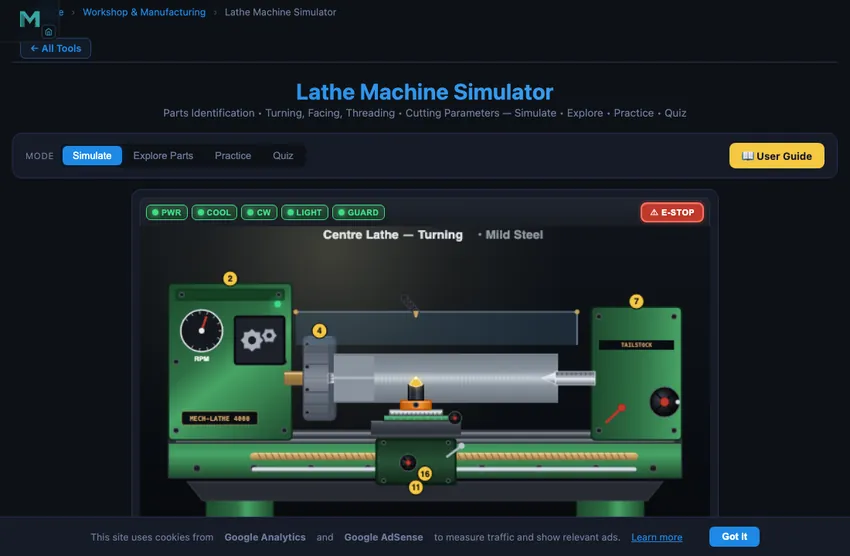
The lathe is the most versatile and widely used machine tool, often called the "mother of all machines." It produces cylindrical surfaces by rotating the workpiece against a stationary cutting tool. The main components include headstock (with spindle and chuck), tailstock (for support), bed (precision-ground ways), carriage (with cross-slide, compound rest, and tool post), and the apron (with feed mechanism and lead screw engagement).
This simulator lets you identify all major parts of a centre lathe, perform turning, facing, threading, boring, and taper turning operations, and calculate cutting speed (V = πDN/1000), material removal rate, power consumption, cutting force, and surface finish in real time.
Lathe Operations
Primary operations include: Turning (reducing diameter), Facing (machining end surface), Boring (enlarging internal diameter), Threading (cutting screw threads), Taper Turning (producing conical surfaces), Knurling (creating textured grip patterns), and Parting/Cut-off (separating finished parts). Each requires different tool geometry, speed, and feed settings.
Working a Classic Lathe in 3D
The 3D view puts you at the front of a conventional centre lathe. Each operation is set up the way a machinist would: the right holder drops into the quick-change post, the carriage comes up to the work, and the cross-slide is wound in to depth. Turning, facing, taper turning with the compound, boring with the bar in a side holder, knurling and screw cutting all cut real geometry. The thread is a true 60° helix whose pitch is set by the quick-change gearbox. The half-nut waits for the thread dial, which is why a re-engaged pass follows the groove it started.
Lathe Specifications
A lathe is specified by: Swing over bed (max workpiece diameter), Distance between centers (max workpiece length), Spindle bore diameter, Range of spindle speeds (RPM), Number of feeds available, Motor power (HP/kW), and Bed length. Understanding these specifications helps in selecting the right lathe for a given job.
Picking Speed and Feed — A Worked Mild-Steel Job
You are turning a 50 mm diameter mild steel bar with a HSS tool. The handbook says cutting speed for mild steel with HSS is 25−30 m/min. Pick V = 28 m/min. What spindle RPM do you set?
| Step | Working | Result |
|---|---|---|
| Apply cutting speed formula | V = πDN/1000 | — |
| Rearrange for N | N = 1000V/(πD) = 1000×28/(π×50) | N = 178 RPM |
| Round to nearest available gear | typical lathe steps: 80, 125, 180, 250 RPM | Use 180 RPM |
| Actual cutting speed at 180 RPM | V = π×50×180/1000 | 28.3 m/min ✓ |
| Feed for finish pass on mild steel with HSS | recommended 0.1−0.2 mm/rev | 0.15 mm/rev |
| Material removal rate (per pass, 0.5 mm depth) | MRR = V × f × d × 1000 | 2125 mm³/min |
Three rules of thumb that come straight from the workshop:
- HSS tools cut at one third the speed of carbide. If you switch from HSS to a carbide insert, multiply your RPM by about three. The carbide can take the heat.
- Smaller diameter, higher RPM. As you turn down a long taper, the diameter drops. Strictly the RPM should rise to maintain constant V. Modern CNC lathes do this automatically (constant surface speed mode, G96); on manual lathes you change gear occasionally.
- Slow down for threading. Threading cuts at roughly one quarter the turning speed for the same material, because the chip is much wider relative to the depth of cut.
Workshop Safety — Five Things My Old Instructor Made Us Repeat
- Stop the spindle before measuring. A vernier caliper on a rotating workpiece can fly out and hit you, or worse, drag your hand in.
- Remove the chuck key. Every chuck key has a return spring. If you leave it in and the spindle starts, it becomes a missile. The number of workshop ceilings with chuck-key dents is shocking.
- Tie back hair, no jewellery, no loose sleeves. Anything that can wrap around a rotating workpiece will. A wedding ring caught in a chuck once cost a colleague a finger.
- Cutting tool sharp, not blunt. A blunt tool generates more heat and force; it wears faster and produces a worse finish. Re-grind regularly.
- Watch the chip colour. Light blue chips from steel mean the cut is right. Dark blue or black means the tool is overheating; reduce speed or add coolant. Silver is too cool; you can push harder.
References for Lathe Work
- Krar, S. F., Gill, A. R. & Smid, P. — Technology of Machine Tools, 8th ed., McGraw-Hill. The North American workshop reference.
- Sharma, P. C. — A Textbook of Production Engineering, 14th ed., S. Chand. Widely used in Indian polytechnics.
- Sandvik Coromant — Modern Metal Cutting. The industrial reference for cutting-speed and feed data, freely available online.
- BS 5050:1973 — Specification for centre lathes for general purposes. The British Standard still cited in engineering education.
Explore Related Simulators
If you found this Lathe Machine simulator helpful, explore our Milling Machine simulator, Drilling Machine simulator, Thread Nomenclature trainer, and Vernier Caliper simulator for more hands-on practice. For the cutting numbers behind turning, facing and parting, the Speeds & Feeds Calculator gives spindle speed, feed rate and cutting power for the tool and material. When the same cuts are written as a program instead of being turned by hand, the CNC G-Code Simulator runs the blocks one at a time and shows where the tool actually goes.
Updated