Free Fall Simulator
Gravitational Acceleration • Kinematics • Terminal Velocity — Simulate • Explore • Practice • Quiz
Display Controls
Σ Live equations — values substituted from current state
💡 What-if coach — insights from current values
1 Overview
This free free fall simulator lets you drop virtual objects under gravitational acceleration g = 9.81 m/s² and observe the kinematics equations in action. The interactive canvas displays the falling object with a real-time height vs time graph, while readout cards show height, distance fallen, velocity, time, g value, and planet. You can compare gravity on Earth, Moon, Mars, and Jupiter, toggle air resistance to observe terminal velocity, and drop two balls simultaneously to verify that mass does not affect free fall in a vacuum.
The tool demonstrates the core free fall equations — s = ½gt², v = gt, v² = 2gs, and t = √(2h/g) — with animated visual proof. Designed for physics and engineering students studying kinematics and gravitational mechanics.
2 Setting the Scene

The simulator opens in Simulate mode on Earth with a default drop height of 20 m. The canvas shows the ball at the top of the drop tower with the ground below. Six readout cards display Height, Distance Fallen, Velocity, Time, g, and Planet.
Use the Mode pills to switch between Simulate, Explore, Practice, and Quiz. The Planet pills switch between Earth, Moon, Mars, Jupiter, and a Custom g option. Toggle checkboxes enable Air Resistance and a Two Balls comparison mode.
3 Running the Demo
Set the Drop Height (1 m up to 10 km) using the slider — it is log-scaled, so the common 1–100 m range occupies the first half and you can still reach 10,000 m at the top; type an exact value in the box for precision. Select a planet to set the gravitational acceleration, or use the Custom option to enter any g value (0.5–30 m/s²). Press Drop to release the ball.
Playback speed: a 10 km drop takes ~45 s in real time (longer with air resistance), so the Speed control time-compresses tall drops. Leave it on Auto (it sizes the drop to a few seconds and shows the chosen factor, e.g. “Auto → 10×”) or pick a fixed 1×–25×. The stopwatch and all readouts always show true physical time, and an on-canvas “▶ N× time” badge marks when compression is active.
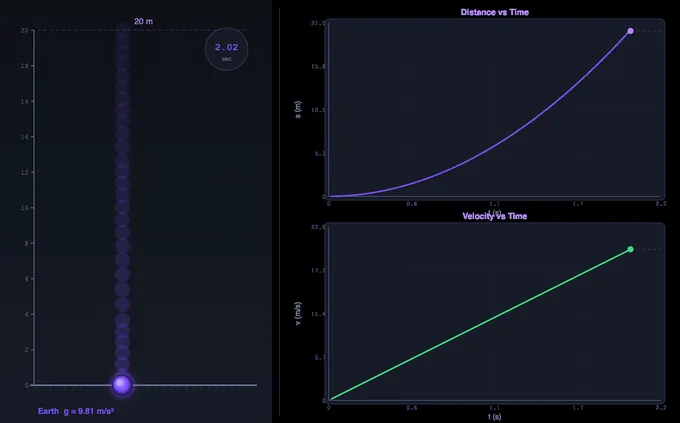
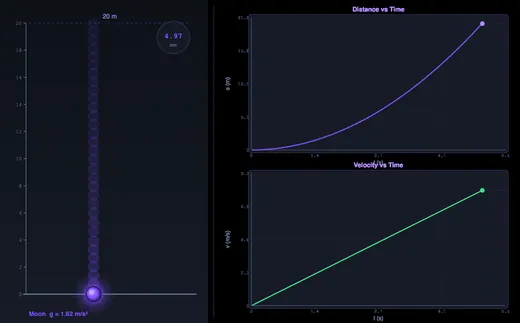
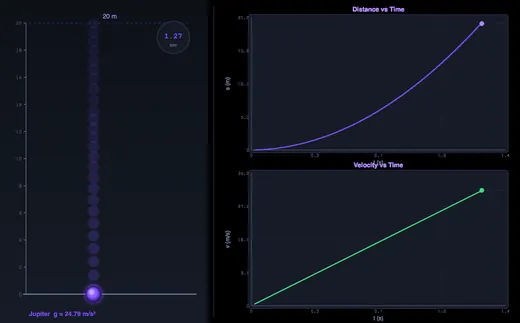
The ball accelerates downward and the readout cards update in real time: velocity increases linearly with time (v = gt), and distance grows quadratically (s = ½gt²). The canvas graph plots both distance and velocity versus time.
Air Resistance: Toggle this on to see the ball approach terminal velocity — the speed at which drag equals weight and acceleration drops to zero. Turning it on reveals two extra sliders, Ball Mass and Ball Diameter, because those are the only things that change vt = √(mg / ½CdρA); the live vt readout beside them updates as you drag. The drag model uses Cd = 0.47 (sphere) with an atmosphere that thins exponentially with altitude, and it is planet-aware — the Moon has no air, so the toggle correctly changes nothing there and says so.
Two Balls: Enable this to drop two balls of different sizes simultaneously. In vacuum (air resistance off), both hit the ground at the same time, replicating Galileo’s famous experiment. With air resistance on the heavier ball (10× the mass, 2× the diameter) falls distinctly faster — its terminal velocity is √(10/4) = 1.58× higher, because vt grows with √m but shrinks with the radius.
Press Reset to return the ball to the starting position.
4 Behind the Physics
Explore mode provides concept cards across four categories: Gravity Basics (what is g, variation with altitude and latitude), Kinematics (the four free fall equations, derivations), Free Fall (Galileo’s experiment, Apollo 15, terminal velocity), and Applications (drop towers, skydiving, parachute design). Each card includes a formula, canvas diagram, and worked numerical example.
Use this mode to understand the theory behind the simulation — why all objects fall at the same rate in vacuum, how air resistance creates terminal velocity, and how the kinematic equations are derived from constant acceleration.
5 Try a Problem
Practice mode generates unlimited random problems: calculate fall time from a given height, find the velocity at impact, determine the height from which an object was dropped given its impact speed, or compare fall times on different planets. Full step-by-step solutions are shown for incorrect answers.
Quiz mode presents 5 randomised questions per session, mixing conceptual items (e.g., what happens to a feather and hammer on the Moon) with numerical calculations. A detailed score breakdown is shown at the end.
6 Things to Notice
- Compare planets: Drop from the same height on Earth, Moon, and Jupiter to see how dramatically different g values affect fall time and impact velocity.
- Use Two Balls mode with air resistance off to prove that mass does not affect free fall in a vacuum — both balls hit the ground simultaneously.
- Toggle air resistance to see terminal velocity emerge: the velocity readout flattens as drag equals weight.
- Use Custom g to simulate free fall on any celestial body — try Venus (8.87 m/s²) or Pluto (0.62 m/s²).
- Check the formula row below the readouts to see all four kinematic equations at a glance.
- The simulator works offline once loaded — ideal for classroom demonstrations.
7 Units, Presets, Calculations & Shortcuts
Presets: One click loads a ready-made scenario — Classroom Drop (Earth, 20 m), Apollo 15 (Moon, two balls), Skydiver (500 m with air resistance on an 80 kg body carrying a skydiver’s drag area — it takes roughly 600 m to reach 99% of terminal velocity, which is why 100 m would show nothing), Bremen Drop Tower (110 m — the evacuated drop tube inside the 146 m tower, giving the real 4.74 s), Galileo Two Balls, and HALO Jump (a 10 km drop with air resistance — watch the speed overshoot the sea-level terminal velocity in the thin air up high, then decay back towards it as the air thickens). Adjusting any control afterwards de-highlights the preset.
Steppers: Each slider has a companion number box — type an exact Drop Height or Custom g value instead of dragging.
SI / Imperial units: Use the Units toggle to switch every length, velocity and acceleration readout between metric (m, m/s, m/s², kg, cm) and Imperial (ft, ft/s, ft/s², lb, in). Both graph axes, the ball mass and diameter sliders and the custom-g slider all carry the selected units. All physics is computed in SI internally; only the display converts.
Show Calculations: Press the Show Calculations button on the canvas to open a step-by-step derivation modal — fall time, impact velocity, the s = ½gt² check, and energy per unit mass, all rendered in classical math notation. With air resistance on, a fifth step solves m·dv/dt = mg − ½CdρAv² numerically and reports the true vt, fall time and impact speed beside the vacuum values.
Learning panels: Below the controls, the collapsible Live equations panel substitutes your current height and g into every kinematic equation, and the What-if coach offers insights (planet comparison, the √2 height rule, terminal velocity). Both are drag-aware: with air resistance on they mark the vacuum equations as a reference and add the integrated fall time, impact speed and vt the animation will actually produce. Use Expand all / Collapse all to manage them.
Show Equation / Show Grid: Toggles for the on-canvas rolling equation overlay and the graph grid lines.
Export: The action bar (and the right-click menu) provide CSV export of the full time-history (t, s, v) and PNG export of the canvas with a watermark — ideal for worksheets and study sheets. The CSV header records which model produced the data (vacuum, or drag with the mass, radius and atmosphere used), and exporting before a run generates the curve for whichever model is currently selected.
Right-click menu: Right-click the canvas for quick actions — Drop, Reset, Copy impact velocity, Export CSV/PNG, and toggle the grid or canvas equation.
Keyboard shortcuts: In Simulate mode press Space to drop and R to reset. A short impact sound plays when a ball lands (procedurally generated, no downloads).
8 The 3D Drop Site
On a computer or tablet the simulator opens in 3D; on a phone it opens in 2D, and the 2D | 3D switch next to Reset changes view at any time (your last choice is remembered). The 3D view shows the same drop as a real outdoor experiment, built at true scale in metres. Every control works in 3D exactly as in 2D — height, planet, custom g, air resistance, ball mass and diameter, two balls, units, playback speed, the presets and the two display toggles — and the ball is always where the simulation engine puts it. Switching views never restarts a drop.
What you see: up to 150 m (about the height of the tallest real drop towers) the ball hangs in the jaws of a release head on a lattice mast, beside a graduated staff whose zero is the contact pad in a sand pit, with the timer clamped to the mast. Higher than that no mast is real, so the release is a helium balloon gondola — its envelope sized so the air at that height really floats it — or, on the Moon (no air) and Jupiter (helium will not float in hydrogen), a hovering release craft. The sky darkens with the same air density the drag model uses, the ground curves away with the planet’s radius to a real horizon, and the ball’s shadow falls along the sun’s rays.
Working it: tap the ball (or press Drop) to release it, and tap again to put it back. Drag the ball or the release up or down to change the drop height. Drag anywhere else to look around; pinch or Ctrl + scroll to zoom. The 3D view opens on Follow ball, riding beside the ball from the release to the pad; the camera bar also offers Auto (a short drop filmed whole, a tall one followed), Whole rig, From the pad and From the top, and ⟲ returns to Follow ball. Forces draws the weight and the support to one scale before the drop (the release holds the ball) and after it (the pad pushes up) — the mass tags and force labels step aside while the ball falls, so nothing hides the fall; Graph shows the live v–t curve with the vacuum line and vt; Labels names the parts. Faint rings mark the ball at equal time steps, so their widening spacing is the acceleration. Keys: Space drop or reset, V next view, F/G/L forces, graph, labels.
Understanding Free Fall and Gravitational Acceleration
Free fall is one of the most important concepts in classical mechanics. It describes the motion of an object falling solely under the influence of gravity, with no other forces acting on it. In the ideal case (a vacuum), all objects fall at the same rate regardless of their mass or shape. This remarkable insight, attributed to Galileo Galilei, overturned centuries of Aristotelian thinking and laid the foundation for Newtonian mechanics.
The acceleration due to gravity (denoted g) is approximately 9.81 m/s² at Earth's surface. This means a freely falling object increases its speed by 9.81 metres per second every second. This value varies slightly depending on altitude, latitude, and local geological conditions — from about 9.78 m/s² at the equator to 9.83 m/s² at the poles. On other celestial bodies, g differs dramatically: 1.62 m/s² on the Moon, 3.72 m/s² on Mars, and a crushing 24.79 m/s² on Jupiter.
Free Fall Virtual Lab — Measuring g Yourself
This page is a free fall virtual lab: it runs in the browser, needs no sign-up, no download and no licence, and it records the same measurements a physical drop apparatus does. The classic school experiment — determine g using a freely falling object — runs here end to end.
How to run it as a lab. Set a drop height, press Drop, and read the on-canvas stopwatch for the fall time. Repeat for a series of heights — 5, 10, 20, 40, 80 m works well — and record each pair. Then plot s against t²: free fall gives a straight line whose gradient is g/2, so g = 2 × gradient. Because the simulator solves the final partial time-step rather than rounding to the nearest animation frame, the times it reports match t = √(2h/g) to within 0.02%, so a well-drawn graph returns 9.81 m/s² rather than something 3% short.
What you can measure and take away:
- Fall time and impact speed at any height from 1 m to 10 km, on Earth, the Moon, Mars, Jupiter or a custom g between 0.5 and 30 m/s².
- Distance–time and velocity–time graphs drawn live as the ball falls, each with the drag-free curve dashed behind it for comparison — the parabola and the straight line of the textbook, plotted from your own run.
- A CSV of the full time history (t, s, v) and a PNG of the canvas, both exportable for a lab report or a worksheet. The CSV header records which model produced the data.
- Galileo's two-ball test, with a heavier and larger ball dropped alongside the first — identical in vacuum, visibly different in air.
- Six ready-made scenarios, including Apollo 15's hammer-and-feather drop, the Bremen drop tower and a 10 km HALO jump.
- Metric or Imperial throughout, and a step-by-step calculation panel showing the working behind every readout.
Explore mode adds sixteen concept cards with worked examples, and Practice and Quiz modes generate unlimited problems with full solutions — useful for free fall physics graphs practice and for checking a reading before a test.
The Kinematic Equations of Free Fall
For an object released from rest at height h, three key equations govern its motion. The distance fallen is given by s = ½gt², showing that displacement increases with the square of time — a parabolic relationship that proves the object is accelerating, not moving at constant speed. The instantaneous velocity at time t is v = gt, a linear relationship. Combining these gives the time-independent equation v² = 2gs, which relates velocity directly to distance fallen without needing to know the elapsed time. To find the total fall time from height h, rearrange the distance equation: t = √(2h/g).
Galileo's Experiment and the Universality of Free Fall
Galileo's famous thought experiment (and later physical experiments with inclined planes) demonstrated that in the absence of air resistance, a feather and a hammer fall at exactly the same rate. This was dramatically confirmed on the Moon during the Apollo 15 mission in 1971, when astronaut David Scott dropped a hammer and a falcon feather simultaneously — both hit the lunar surface at the same instant. This principle is fundamental to Einstein's equivalence principle and forms the basis of general relativity.
Air Resistance and Terminal Velocity
In the real world, air resistance (drag) opposes the motion of falling objects. The drag force increases with velocity until it equals the gravitational force, at which point the object reaches terminal velocity and stops accelerating. A skydiver reaches approximately 55 m/s (200 km/h) in the spread-eagle position — that figure needs a drag area CdA ≈ 0.40 m², i.e. Cd ≈ 0.57 on the usual 0.70 m² frontal area. A peregrine falcon can dive at over 90 m/s. Parachutes exploit this principle by increasing drag area to reduce terminal velocity to a safe landing speed of about 5 m/s.
Worked Example — Stone Dropped from 80 m
A stone is released from rest at the top of an 80 m cliff. Take g = 9.81 m/s² and ignore air drag for now.
| What you want | Equation | Working | Answer |
|---|---|---|---|
| Time to hit the ground | t = √(2h/g) | √(2×80/9.81) = √16.31 | 4.04 s |
| Velocity at impact | v = gt | 9.81 × 4.04 | 39.6 m/s (143 km/h) |
| Velocity at impact (cross-check) | v = √(2gh) | √(2×9.81×80) | 39.6 m/s ✓ |
| Distance fallen at t = 2 s | s = ½gt² | ½×9.81×4 | 19.6 m (only ¼ of the height — the stone is still accelerating) |
| Velocity at t = 2 s | v = gt | 9.81 × 2 | 19.6 m/s |
The last two rows are the most common exam trap: students assume the stone is half-way down at half the fall time. It is actually only 25% of the way down at half-time, because displacement grows with t² while velocity grows linearly with t. You can verify this in the simulator’s graph view — the s-vs-t curve is the parabola, the v-vs-t curve is the straight line.
When Free Fall Isn’t Free — Air Drag and Terminal Velocity
The kinematic equations above all assume vacuum. Drop a real object through real air and the drag force Fd = ½ρCdAv² opposes motion. When drag equals weight, acceleration is zero and velocity is constant — terminal velocity:
vt = √(2mg / ρCdA)
| Object | Approx. terminal velocity | Time to reach 99% of it |
|---|---|---|
| Skydiver, spread-eagle (m = 75 kg, CdA ≈ 0.40 m²) | ~55 m/s (200 km/h) | ~15 s — about 600 m of fall |
| Skydiver, head-down (smaller A, lower Cd) | ~90 m/s (320 km/h) | ~24 s — about 1.6 km; less drag means longer to terminal |
| Raindrop, 2 mm radius | ~9 m/s | ~2.4 s — about 16 m; small mass / large surface reaches vt in metres, not km |
| Steel ball bearing, 10 mm radius (m = 33 g, Cd = 0.47) | ~60 m/s | ~16 s — about 700 m; the large mass keeps drag from catching up quickly |
| Open parachute (A ≈ 28 m²) | ~5 m/s | ~1.4 s from rest; 2–3 s to decelerate from freefall speed once the canopy opens |
Two practical points: (1) for fall heights below ~5 m the vacuum equations are accurate to within a few percent even in air — that is why textbook problems skip drag. (2) Above 50–100 m, drag matters a lot for low-mass / large-area objects (a sheet of paper, a feather, a parachute) but very little for dense compact objects (a steel sphere, a stone).
One caveat the table hides: ρ is not a constant. Air density falls off with altitude — the ISA troposphere relation ρ = ρ0(1 − 2.2558×10⁻⁵h)4.2559 holds to 11 km — so at 10 km it is 0.413 kg/m³, a third of the sea-level value. (A plain exponential fitted at sea level with the usual 8.5 km scale height would give 0.378 here, about 9% low, which is why this simulator uses the ISA form.) Terminal velocity therefore falls as a high-altitude jumper descends, and the body genuinely decelerates through the middle of the drop. This simulator integrates that varying density, which is why the HALO Jump preset shows the velocity curve rise past its sea-level vt and then come back down instead of holding one flat line. It is also why air resistance does nothing on the Moon (no atmosphere at all) and almost nothing on Mars (ρ ≈ 0.020 kg/m³, 1.6% of Earth’s) — switch planets in the simulator and the drag model follows.
Air Resistance on Other Planets — Why the Moon Has None and Mars Almost None
Gravity is only half of what decides a fall. The other half is the atmosphere, and it changes far more between worlds than g does. Earth's sea-level air is 1.225 kg/m³; Mars manages 0.020 kg/m³ — about 1.6% of Earth's — and the Moon has none at all. So on the Moon the vacuum equations are not an approximation, they are exact, which is precisely why Apollo 15 could run the hammer-and-feather test there and not in Houston.
This simulator models each body's own atmosphere. Switch to the Moon with Air Resistance switched on and the toggle correctly does nothing — the tool says so rather than quietly applying Earth's air to an airless world. Terminal velocity for the same ball, computed by the simulator itself:
| Body | g (m/s²) | Surface air density ρ (kg/m³) | Terminal velocity of a 1 kg, 100 mm sphere |
|---|---|---|---|
| Earth | 9.81 | 1.225 | 65.9 m/s |
| Mars | 3.72 | 0.020 | 318 m/s* |
| Jupiter (1-bar level) | 24.79 | 0.16 | 290 m/s* |
| Moon | 1.62 | 0 | None — no atmosphere, so the ball never stops accelerating |
*The Mars and Jupiter figures are what a constant drag coefficient of Cd = 0.47 gives, and both exceed the local speed of sound (~240 m/s on Mars), where a fixed Cd stops being valid. Read them as a measure of how thin the air is rather than as validated speeds. The Earth figure is well inside the subsonic range the model is good for.
Earth's own air thins with height, so terminal velocity is not one number even here. For that same 1 kg sphere the simulator gives 65.9 m/s at sea level, 85.0 m/s at 5 km and 113.5 m/s at 10 km. A body dropped from high altitude therefore overshoots its sea-level terminal velocity in the thin air and decelerates as it falls into denser air — load the HALO Jump preset and watch the velocity curve rise to a peak and come back down. A model with a fixed ρ cannot show that at all.
Apollo 15 — The Universality Check Done Live on the Moon
On 2 August 1971, Commander David Scott held a 1.32 kg geological hammer in his right hand and a 0.03 kg falcon feather in his left, in front of the live television camera on the lunar surface. He released both from the same height (~1.6 m). With no atmosphere, the two objects fell with identical acceleration (gMoon = 1.62 m/s²) and struck the regolith at the same instant. Predicted fall time t = √(2×1.6/1.62) = 1.41 s; the recorded video shows them landing within video-frame precision of each other.
The experiment was a public demonstration of an idea Galileo argued without ever being able to prove cleanly — in air, the lighter object always loses. The Moon’s vacuum removed the only remaining variable. Switch the simulator to Moon mode to reproduce Scott’s drop time numerically.
Gravity Isn’t Uniform — g Across the Earth and Solar System
| Location | g (m/s²) | Why |
|---|---|---|
| Equator, sea level | 9.780 | Centrifugal effect of Earth’s rotation reduces apparent g; the equatorial bulge moves you further from the centre |
| 45° latitude, sea level | 9.806 | The conventional standard value (g0) |
| Poles, sea level | 9.832 | No centrifugal reduction; closer to Earth’s centre |
| Top of Mount Everest (8849 m) | 9.764 | Further from Earth’s centre (1/r² falloff) |
| ISS orbit (400 km altitude) | 8.69 | The crew floats not because g is zero but because they are in continuous free-fall |
| Moon surface | 1.62 | Smaller mass, smaller radius |
| Mars surface | 3.72 | About 38% of Earth gravity |
| Jupiter (1-bar cloud tops) | 24.79 | Massive but gas, no solid surface |
For laboratory-grade work in metrology and gravimetry, local g is measured to 8 decimal places using a free-fall apparatus — the same vacuum-drop experiment shown in this simulator, but with a corner-cube reflector falling inside an evacuated chamber and a laser interferometer reading its position.
Free Fall 3D Simulation — a Drop Tower You Can Walk Around
On a computer or tablet this free fall simulator opens in 3D; on a phone it opens in 2D, and the 2D | 3D switch next to Reset changes view at any time. It runs free in the browser with no download. The 3D view is the same drop built as a real outdoor experiment at true scale in metres. Up to 150 m (about the height of the tallest real drop towers) the ball hangs in the jaws of a release head on a lattice mast beside a graduated staff, and it lands on a contact pad in a sand pit. Higher than 150 m no mast is real, so the release becomes a helium balloon gondola whose envelope is sized so the air at that height really floats it. On the Moon (no air) and on Jupiter (helium does not float in hydrogen) a hovering release craft takes its place.
The ball is always where the simulation engine puts it, so the fall time, speed and terminal velocity in 3D are exactly the numbers on the readout cards. The camera starts on Follow ball, riding beside the ball from the release to the pad. Faint rings mark the ball at equal time steps, and their widening spacing is the acceleration g made visible. The sky darkens with the same air density the drag model uses, and the ball’s shadow falls along the sun’s rays. Drag the ball or the release up or down to change the drop height.
Drop two balls of different mass in vacuum and they land at the same instant in 3D, just as in 2D: Galileo’s result, and the Apollo 15 hammer-and-feather test. Turn air resistance on and the heavier ball lands first. For orbits rather than drops, open the gravity simulator. Other simulators with a 3D view include the simple machines workshop and the falling-ball viscosity experiment.
Selected References
- Halliday, Resnick & Walker — Fundamentals of Physics, 11th ed., Chapter 2 (Motion Along a Straight Line) and Chapter 13 (Gravitation).
- Stinner, A. (2002) — The Story of Force: from Aristotle to Einstein. Physics Education 37, 77.
- NASA Apollo 15 Press Kit and lunar-surface video archive, NASA Technical Reports Server.
- BIPM — The International System of Units (SI), 9th ed., for the conventional value gn = 9.80665 m/s².
Explore Related Simulators
If you found this free fall simulator helpful, explore our Refraction of Light simulator, Boyle's Law simulator, Charles's Law simulator, Thermal Expansion simulator, and Thermodynamics Cycles simulator, and the Collision & Momentum simulator for what a falling body does when it lands. The same law of gravitation that sets g also holds the planets in their orbits: see it in the Gravity Simulator.
Updated