Cutviewer Alternative: A Free CNC Simulator for Learning G-Code (vs CIMCO Edit and Vericut)
A free alternative to Cutviewer or CIMCO Edit for learning G-code is MechSimulator’s CNC G-code simulator, a browser tool that backplots milling and lathe programs, cuts a 3D plate or bar, and teaches the codes through a 41-lesson course. It costs nothing and needs no account. It is not a production verifier, though, and this page is clear about where the paid tools still win.
- For students and instructors, a free browser simulator covers the backplot, the stock removal and the teaching. MechSimulator also opens .nc, .tap and .gcode files by Import or drag-and-drop.
- CIMCO Edit is still the tool for DNC transfer, file compare and NC-specific editing. Vericut is still the tool for full machine simulation and crash prevention.
- NC Viewer and CAMotics are free too. What MechSimulator adds is lathe material removal, a structured course and plain-English warnings.
Why do students go looking for a Cutviewer alternative?
Every year I get the same email in week three of a CNC module. A student has a program from the college lab, a laptop at home, and no way to see what the code does. The college licence for the verification software lives on six workstations in one room. So they search “Cutviewer free” or “CIMCO Edit free download” and land on trial pages.
Here’s the thing. Most of those students don’t need production software. They need to watch G02 go the right way round. They need to see that G91 left on makes the toolpath wander off the plate. A machinist checking a 40,000-line five-axis program for a fixture clash has a different problem, and should pay for the tool built for it.
There’s also some confusion about the name. The classic Cutviewer, sold in two versions as Cutviewer Mill and Cutviewer Turn, was paid desktop software; its archived 2017 site lists Purchase and Download pages, a full 3D simulation of the finished part, and collision detection for a cutter shank touching the stock. Visit cutviewer.com today and you get a different product: a free browser G-code viewer from GRZ Software LLC, built for milling.
What do Cutviewer, CIMCO Edit and Vericut actually do?
Before comparing, it helps to be fair about each paid tool. All three statements below come from the vendors’ own pages.
Cutviewer Mill and Cutviewer Turn
A stock-removal simulator. You defined the stock and the cutters, and it showed the finished part, flagged rapids into the stock, let you measure the result and compare it with an STL. That is real verification, not just a toolpath line.
CIMCO Edit
CIMCO Edit is a Windows-based NC editor first. It has a backplotter for 3, 4 and 5-axis milling, turning and mill-turn, file compare that spots new, changed and deleted lines, and DNC transfer over RS-232 and FTP. The Ultra edition adds solid simulation and collision detection. CIMCO says most of its products can be evaluated free for 30 days; no price is published.
Vericut
Vericut works at another level. It builds a digital twin of your machine and simulates the whole CNC process alongside your CAM system, with add-ons such as Force optimisation. Pricing is by demo and licence request.
Honest comparison: paid tools vs a free browser simulator
| What you need | MechSimulator (free) | Cutviewer Mill / Turn (classic) | CIMCO Edit | Vericut |
|---|---|---|---|---|
| Cost to start | Free, no account | Purchased licence | 30-day evaluation, price not published | Demo / licence request |
| Where it runs | Any modern browser | Downloaded desktop program | Windows | Licensed software |
| Backplot of a program | Yes, mill and lathe | Yes | Yes, 3/4/5-axis, turning, mill-turn | Simulates NC programs on a machine model |
| Solid stock removal | Yes: plate in a vice, bar in a chuck | Yes | Ultra edition | Simulates the whole CNC process |
| Collision or gouge checking against holders and fixtures | No | Shank and rapid contact with the stock | Ultra edition | Crash prevention on a machine digital twin |
| Machine-specific controls and post output | Fanuc-style ISO only; G54–G59 treated as zero, G43 and G41/G42 not applied, no M98 or macros | Common G-code formats | NC editing tools: renumbering, NC-Assistant | Built around your machine |
| DNC, file compare, renumbering | No | Not listed | Yes | Not its job |
| Teaching course, practice, quiz | 41 lessons, Practice and Quiz modes | Not listed | Not listed | Not listed |
Read the “No” cells in our column first. They matter more than the “Yes” ones. Our interpreter draws the path on the tool centreline, as programmed, and it can’t tell you a clamp is in the way. Product names in this article are trademarks of their owners, and MechSimulator is not affiliated with any of them.
What about NC Viewer, CAMotics and the new CutViewer?
These are the tools AI assistants usually suggest, and they’re good. All three are free.
- NC Viewer runs in the browser, has a diameter mode for lathe code and a 5-axis movement toggle with A, B and C readouts. Its page doesn’t describe stock removal.
- CAMotics is open source (GPL), installs on Linux, macOS or Windows, and does a fast 3-axis cut-workpiece simulation. Its own site lists “No Lathe simulation” as a limitation.
- CutViewer (browser) adds job statistics and pre-flight checks such as missing feed rates and rapids below Z0. Its comparison page marks lathe diameter mode as “No”.
So what does MechSimulator add? Three things, each checkable on the tool page. It removes material on the lathe as well as the mill. It explains mistakes instead of only drawing them. And it has a course that a teacher can assign.
Which one should you pick?
Match the tool to the job, not to the price tag.
- Learning G-code, or teaching it: MechSimulator. The course, the Practice and Quiz modes and the warnings are built for a beginner.
- A quick look at a 4- or 5-axis file: NC Viewer, which handles rotary axes that ours doesn’t.
- Offline 3-axis cut simulation on your own PC: CAMotics.
- Sending programs to machines and comparing revisions: CIMCO Edit.
- Proving a production program on a real machine model before it runs: Vericut, or the verification inside your CAM system.
Plenty of shops use two of these. A free viewer on every laptop, and one paid seat for the jobs where a mistake costs a spindle.
What does the free simulator do with your file?
Open a program with Program → Import file… or drag it onto the editor. It accepts .nc, .gcode, .tap, .cnc and .txt, reads the file in your browser and never uploads it. The whole toolpath is plotted at once, so a long CAM file doesn’t have to be watched line by line. The tool page says a 20,000-line program plotted in about two seconds in testing.
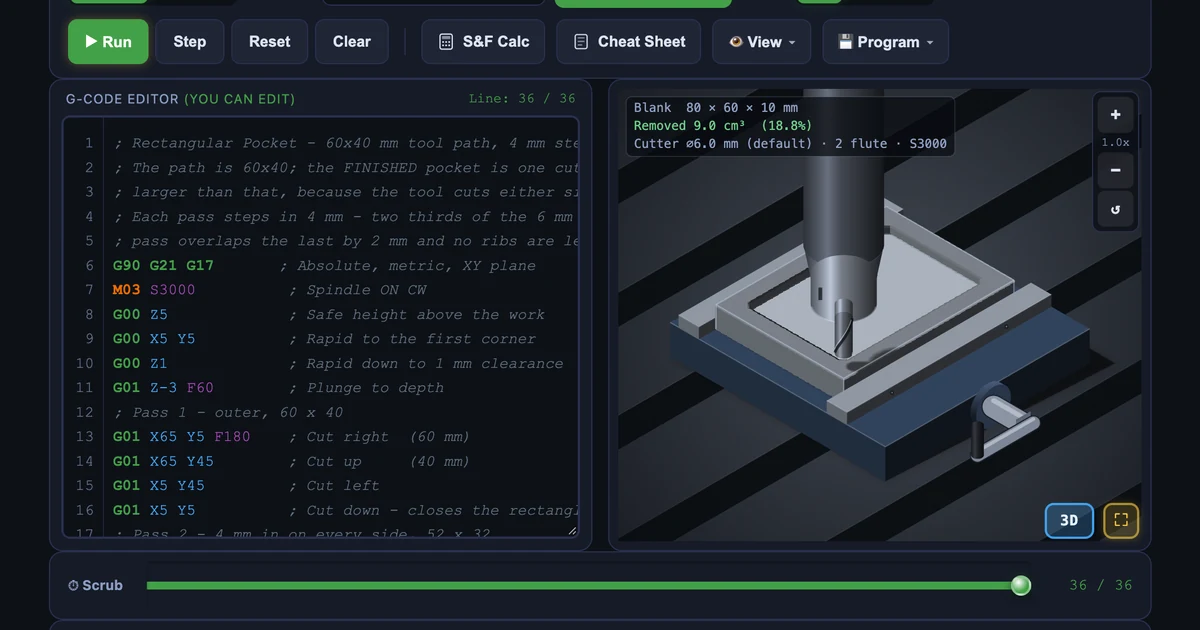
I dropped in a 19-line bracket profile with four arcs. The Toolpath Statistics read 166.8 mm cut distance, 17.0 mm rapid distance, 14 moves, estimated cut time 0:59 and a 50.0 × 40.0 mm bounding box. Then the pocket in the hero image: 36 blocks, a ø6 mm cutter, and 9.0 cm³ gone from an 80 × 60 × 10 mm plate. That checks by hand. A 60 × 40 path with a 6 mm cutter clears roughly 66 × 46 mm at 3 mm deep, about 9.1 cm³ before the rounded corners.
Codes it reads but does not act on go into a warning bar, once each, with a link to the first line. A CAM-posted file with G54 and G43 H1 opens fine. You’re told the offset is treated as zero and the tool length is not applied, which is far better than silently drawing something odd. Ordinary mistakes get plain warnings too: “Cutting move before M03/M04 spindle start”, “G01 with F=0 — machine will stall”, an arc radius mismatch, or coordinates with no motion mode.
Is lathe G-code where the free tools differ most?
Yes, and it’s where students struggle most. Switch to Turning and the dialect changes. X is a diameter, so X50 is a 25 mm radius. U and W replace G91. Feed is per revolution. And G90 stops meaning absolute mode and becomes the turning cycle.
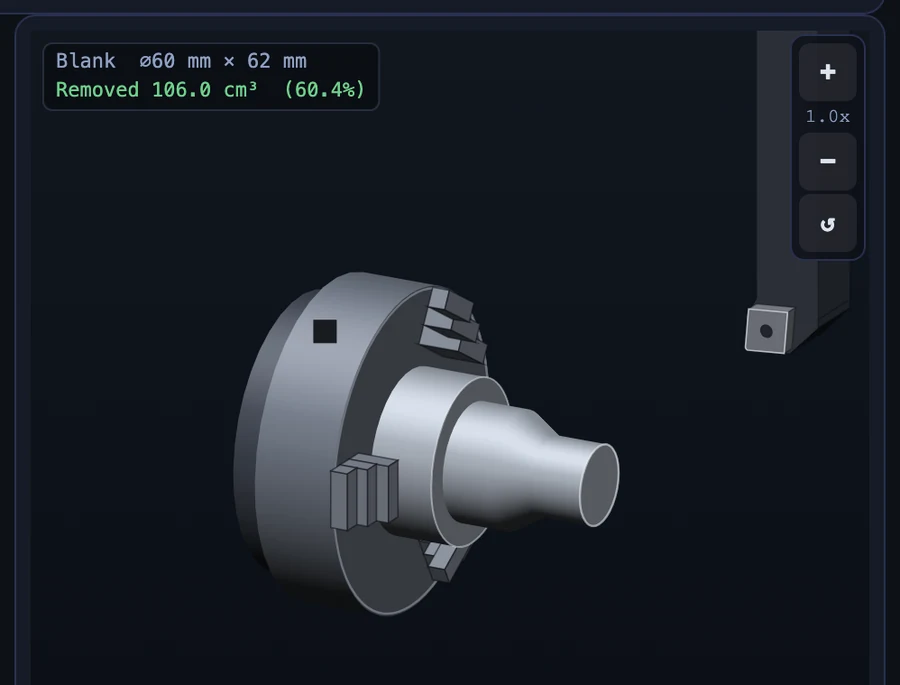
The body image is the simulator’s G71 example: a ø60 mm bar roughed in 2 mm depths of cut, then finished with G70 along the same contour. The legend reports 106.0 cm³ removed, 60.4% of the blank. Change F or the contour and that figure moves, which turns “compare two roughing strategies” into a number rather than a guess.
How should you use it in a CNC course?
Before the first lab. Assign Milling module 1 of the Program Library: five lessons covering G21, G90, G17, M03, G00, G01 and M30. Every lesson program is tested to run without errors and never rapid through metal.
Homework with real files. Students export the program they wrote on the machine as .nc, drop it in at home and bring back the Toolpath Statistics. Cycle time is a good thing to argue about.
Lathe week. Use the 14 turning lessons, ending with G71/G70 and G76 threading, before anyone touches the turret.
Final check stays on the machine. Teach students that the free simulator shows the program, and that the control’s graphics or the CAM verification is still the last word. If you want the code basics first, our step-by-step G-code simulator guide covers G00 to G03 and absolute versus incremental. The same “free tool against paid package” question for fluid power is answered in our FluidSIM alternative article.
Try It Yourself
All tools below are free — no account, no download.
Key Takeaways
- For learning and checking G-code, a free browser simulator covers what most students use Cutviewer or CIMCO Edit for: a backplot and a solid view of the cut.
- CIMCO Edit remains the choice for DNC transfer, file compare and NC editing; Vericut remains the choice for machine and fixture collision checking.
- The name Cutviewer now covers two products: the classic paid Mill and Turn desktop programs, and a free browser viewer at cutviewer.com.
- MechSimulator opens .nc, .gcode, .tap, .cnc and .txt files in the browser and plots the whole program at once with cycle time and bounding box.
- It treats G54–G59 as zero, does not apply G43 or G41/G42, and has no M98 subprograms or macros, and it says so in the warning bar.
- Lathe material removal and a 41-lesson course (27 milling, 14 turning) are what it adds over NC Viewer and CAMotics.
Frequently Asked Questions
What is a free alternative to Cutviewer for learning G-code?
MechSimulator's CNC G-code simulator is a free, browser-based alternative for learning: it backplots milling and lathe programs, removes material from a 3D plate or bar, explains common G-code mistakes in a warning bar and includes a 41-lesson Program Library course. It does not do the collision checking the classic Cutviewer Mill offered, so it is a learning and checking tool rather than a production verifier.
Is there a free alternative to CIMCO Edit?
For the backplot part of CIMCO Edit, yes: free browser tools such as MechSimulator's CNC G-code simulator and NC Viewer plot a program's toolpath without an install. None of them replaces CIMCO Edit's DNC transfer over RS-232 or FTP, its file compare or its NC-specific editing functions, which are the reasons shops buy it.
Can I open an .nc file online and see the toolpath?
Yes. In MechSimulator's CNC G-code simulator choose Program, then Import file, or drag a .nc, .gcode, .tap, .cnc or .txt file onto the editor or the drawing. The whole toolpath is plotted at once with cut distance, rapid distance, estimated cycle time and bounding box. The file is read in your browser and never uploaded. Set the Milling or Turning switch to match the program first.
Does a free G-code simulator check collisions like Vericut?
Not this one. MechSimulator does not model the machine, the fixtures or the tool holder, so it cannot detect a collision or a gouge against a clamp. Vericut simulates a digital twin of the whole machine for that job. Use the free simulator to learn and to see a program, and keep your CAM verification or your control's own graphics as the final check before cutting.
Does the free simulator handle CNC lathe programs?
Yes. The Turning switch reads X as a diameter, uses U and W for incremental moves and feed per revolution, and runs G90 and G94 cycles, G71 roughing with G70 finishing and G76 threading. Material removal shows the bar being turned in the chuck, and 14 of the 41 course lessons are turning lessons.
Paid verification software exists because a crashed spindle costs more than any licence. A student learning what G03 does isn’t in that position yet, and shouldn’t have to wait for a seat in the CAM room to find out.
Drop your next program into the free CNC G-code simulator, press 3D, and see whether the part you meant to cut is the part you wrote.