Column Buckling Calculator
Euler & Johnson Critical Load • 7 Materials • 4 End Conditions • SI / Imperial — Simulate • Explore • Practice • Quiz
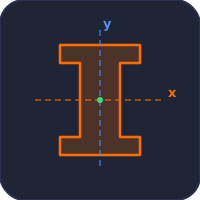
Display Controls
Pcr is relative to the same column pinned at both ends: Pcr ∝ 1/K².
Σ Live equations — values from current state
💡 What-if coach — insights from current values
1 Overview
The Column Buckling Simulator calculates the critical buckling load (Pcr) for compression members using both Euler’s formula and Johnson’s parabolic formula. It automatically selects the correct method based on the slenderness ratio λ = KL/r and displays an animated buckling mode shape when load exceeds Pcr. Supports 7 materials plus custom, 4 end conditions, 4 cross-section shapes, SI / Imperial units, and CSV/PNG export.
2 Entering the Inputs

The simulator opens in Simulate mode with Steel A36, Pinned-Pinned ends, and a Solid Circle cross-section. The top bar offers Mode tabs and a SI / Imperial unit toggle. Use Presets for quick real-world configurations (pipe, square tube, I-beam, timber post), or build your own. Click Run Simulation to compute Pcr, σcr, slenderness, FOS and view the buckling deflection.
3 Inputs & Stepper Controls
Every slider has a companion numeric input for precise entry — type a value or use the up/down arrows. The Length and Applied Load ranges go up to 10 m and 5000 kN respectively. Cross-section dimension sliders adapt to your shape choice. All values automatically convert when you flip the Imperial toggle.
Click + Custom in the Material row to enter your own E and σy values for any material not in the default list.
4 Show Calculations & Learning Panels
Click the Show Calculations button on the canvas (or right-click → Show Calculations) to open a step-by-step modal that walks through every step in classical mathematical notation: effective length, slenderness, transition slenderness, formula selection, critical stress, critical load, and FOS.
The Learning panels below the controls update live with the current state. The Live equations card shows each formula with substituted values; the What-if coach gives insights about your column’s behaviour. Click Expand all / Collapse all to toggle them.
5 Canvas Display Toggles & Right-Click Menu
Use the Display row of checkboxes to show/hide the Le bracket, column dimensions, Euler-Johnson curve plot, and the background grid. Right-click on the canvas to open a context menu with Export CSV, Export PNG, Toggle Grid, Show Calculations, and Reset.
Keyboard shortcuts: Ctrl+Z undo, Ctrl+Shift+Z or Ctrl+Y redo, Esc close any modal.
6 Export & SI / Imperial
The CSV button exports all current parameters and computed results to a CSV file, including Imperial-unit conversions. PNG exports the current canvas with a mechsimulator.com watermark.
The Imperial toggle converts all displayed values: length mm ↔ in, load kN ↔ kip, stress MPa ↔ ksi. Calculations always run in SI internally for accuracy; only the display changes.
7 Explore, Practice & Quiz
Explore mode provides 14 educational concepts across Fundamentals, End Conditions, Materials, and Design — each with a worked example. Practice mode generates random problems from 12 generators with step-by-step solutions. Quiz mode presents 5 questions per session mixing multiple-choice and numeric formats, with a final score and review.
8 Tips & Best Practices
- Pcr ∝ 1/L2 — doubling length quarters the critical load.
- Always use the minimum moment of inertia — the column buckles about its weak axis.
- For Steel A36, the transition slenderness λt ≈ 126.
- Fixed-Fixed (K = 0.5) gives 4× the critical load of Pinned-Pinned (K = 1.0).
- Design FOS: 2.0–3.0 for steel, 3.0–4.0 for timber.
Column Buckling Analysis — Euler and Johnson Critical Load
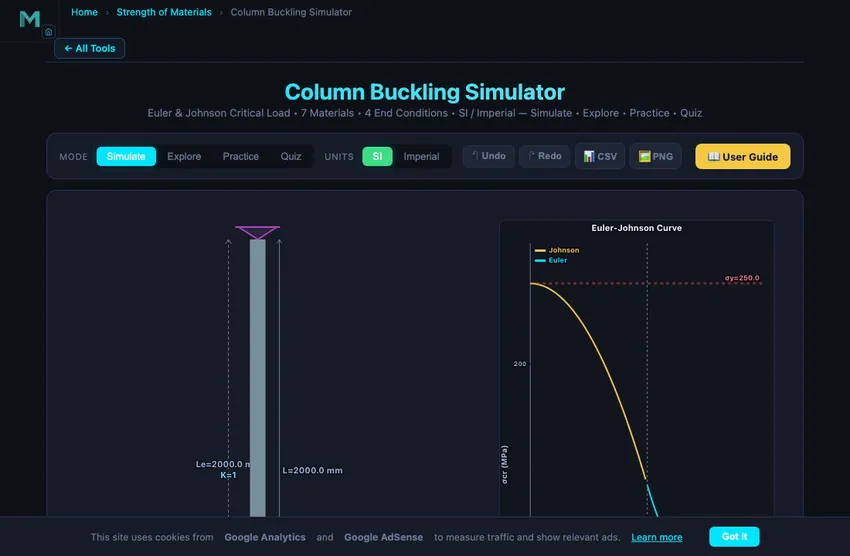
Column buckling is a stability failure where a slender compression member deflects sideways at loads far below yield. Use Euler’s formula for long columns and Johnson’s parabolic formula for intermediate columns. The slenderness ratio λ = KL/r decides which applies.
This simulator computes the critical buckling load Pcr using both Euler and Johnson formulas, animates the buckled shape, and lets you toggle SI / Imperial units and export results. Use it to explore how end conditions, cross-section, length, and material change Pcr.
How Euler’s Buckling Formula Works
Euler’s critical load formula is Pcr = π²EI/(KL)². Critical load grows with stiffness (E) and section size (I) but falls with the square of length. The effective length factor K encodes end conditions: K=1.0 pinned-pinned, K=2.0 cantilever, K=0.5 fixed-fixed, K=0.7 fixed-pinned. Doubling K doubles Le and cuts the Euler load to a quarter; going from fixed-fixed (K=0.5) to a cantilever (K=2.0) cuts it by a factor of 16.
Johnson’s Parabolic Formula for Intermediate Columns
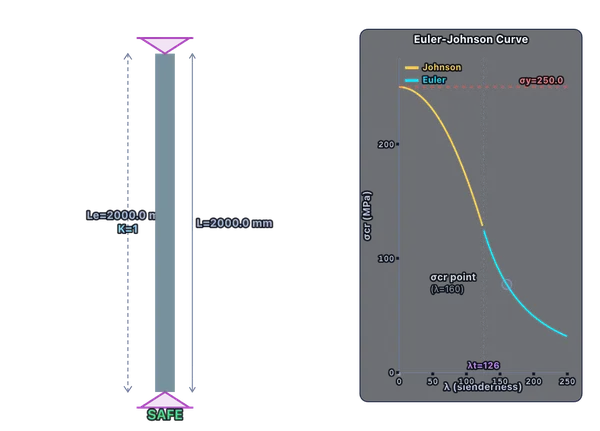
For stockier columns where slenderness falls below the transition value, Euler over-predicts critical stress because it ignores yielding. Johnson’s formula σcr = σy − (σy²/4π²E)×λ² is the standard fix — the curve starts at the yield strength and smoothly meets the Euler curve at λt.
How to Use This Simulator
Pick a preset for a real-world starting point, or set material, end condition, and cross-section, then enter dimensions and load using the sliders or stepper inputs. Click Run Simulation to see results, the animated buckled shape, and the Euler-Johnson curve plot. Use the Show Calculations button for step-by-step derivations in classical math notation, and the Learning panels for live formulas and what-if insights. Export your results via CSV or capture the canvas with PNG. Switch to Explore, Practice, and Quiz modes for guided study and assessment.
A 3 m Steel Column — Where Euler and Johnson Switch
Take a structural steel pipe column: 100 mm outer diameter, 6 mm wall thickness, 3 m long, pinned at both ends. Material S235 steel: E = 200 GPa, σy = 235 MPa. Find the buckling load.
| Step | Working | Result |
|---|---|---|
| Area | A = π(D² − d²)/4 = π(100² − 88²)/4 | 1772 mm² |
| Moment of inertia | I = π(D⁴ − d⁴)/64 | 1.965×106 mm⁴ |
| Radius of gyration | r = √(I/A) = √(1.965×10⁶/1772) | 33.3 mm |
| Effective length (pinned-pinned, K=1) | Le = 1.0 × 3000 mm | 3000 mm |
| Slenderness ratio | λ = Le/r = 3000/33.3 | λ = 90.1 |
| Transition slenderness | λt = √(2π²E/σy) = √(2π²×200,000/235) | λt ≈ 130 |
| Since λ < λt, use Johnson | σcr = σy − (σy²/(4π²E))·λ² | σcr = 235 − (235²/(4π²×200,000))×90.1² ≈ 178 MPa |
| Critical load | Pcr = σcr×A | 316 kN |
If we had blindly applied Euler at this slenderness, we’d get Pcr = π²EI/Le² = π²×200,000×1.965×106/3000² = 431 kN. Euler over-predicts by 36% in this regime because it ignores yielding — and 431 kN is already above the 416 kN squash load (A×σy) that would crush the tube without any buckling. Johnson is the right tool below the transition slenderness.
Why End Conditions Matter More Than Anything Else
Slenderness ratio drives critical load, and end conditions drive slenderness through K. The numbers tell the story:
| End condition | K factor | λ = KL/r | Formula | Euler alone would say | Pcr for our 3 m column |
|---|---|---|---|---|---|
| Fixed-fixed (no rotation either end) | 0.5 | 45.0 | Johnson | 1724 kN | 391 kN (1.24× baseline) |
| Fixed-pinned | 0.7 | 63.1 | Johnson | 880 kN | 367 kN (1.16× baseline) |
| Pinned-pinned (baseline) | 1.0 | 90.1 | Johnson | 431 kN | 316 kN |
| Fixed-free (cantilever) | 2.0 | 180.2 | Euler | 108 kN | 108 kN (−66% from baseline) |
On Euler alone the fixed-fixed column would carry 16 times the cantilever (1724 kN against 108 kN). It cannot: no column carries more than its squash load, A×σy = 416 kN for this tube, and Johnson’s curve bends the answer down towards it. So for a stocky column, fixing the ends buys only 24% here, while freeing one end still costs two-thirds of the capacity. End conditions matter most on slender columns, where Euler governs and the full factor of 16 between a cantilever and a fixed-fixed column is real — which is why tall, slender steel frames rely on stiff, moment-resisting joints.
Buckled Mode Shapes for Each End Condition
At the critical load a column bends into its first buckling mode, and each pair of supports gives a different shape. With x measured up from the base (x = 0 at the base, x = L at the top) and δ the largest sideways deflection, the four classic cases are:
| End condition | K | Mode shape y(x) | Where Le comes from |
|---|---|---|---|
| Pinned-pinned | 1.0 | y = δ sin(πx/L) | One half sine wave between the pins: Le = L |
| Fixed-free (cantilever, fixed at the base) | 2.0 | y = δ [1 − cos(πx/2L)] | A quarter sine wave; mirrored below the base it is a pinned span of 2L, so Le = 2L |
| Fixed-fixed | 0.5 | y = (δ/2) [1 − cos(2πx/L)] | Inflection points at x = L/4 and 3L/4, so Le = L/2 |
| Fixed-pinned (fixed base, pinned top) | 0.699 | y ∝ sin(βx/L) − β cos(βx/L) + β(1 − x/L), with tan β = β, β = 4.4934 | Inflection point at x = 0.301L, so Le = 0.699L and Pcr = 20.19 EI/L² |
The effective length Le = KL is the length of the equivalent pinned-pinned column: the distance between the mode shape’s inflection points, where the bending moment is zero. The exact fixed-pinned value is K = 0.699, which textbooks round to 0.7, as this calculator does. Design codes recommend larger values because real fixed ends are never perfectly rigid — the AISC Commentary gives 0.65 for fixed-fixed, 0.80 for fixed-pinned and 2.1 for a cantilever. In the simulator, choose an end fixture and press Run: the drawn column follows these exact shapes, and the Le bracket spans the inflection points.
Where Real Columns Differ From Theory
- Initial crookedness. No real column is perfectly straight. Steel fabrication standards (EN 1090-2, AISC 303) allow an out-of-straightness of about L/1000, and the column buckling curves in Eurocode 3 and the AISC Specification are calibrated to include it. The actual load capacity is lower than the perfect-column value; the simulator starts every column with an L/1000 bow and shows it grow as the load approaches Pcr.
- Eccentric loading. Real loads aren’t exactly axial. Use the secant formula or interaction equations from steel codes.
- Local buckling. Thin-walled sections (high D/t for pipes) can buckle locally in the wall before global Euler buckling occurs. Check the local slenderness too.
- Lateral-torsional buckling. An I-beam under bending can twist sideways and out of plane. A pure compression member won’t do this, but a beam-column might.
Frequently Asked Questions
What is Euler's critical buckling load formula?
Euler's critical buckling load is Pcr = π²EI/(KL)², where E is the elastic modulus, I is the minimum moment of inertia, K is the effective length factor, and L is the column length. K equals 1.0 for pinned-pinned, 2.0 for fixed-free, 0.5 for fixed-fixed, and 0.7 for fixed-pinned. The formula applies to long, slender columns that buckle elastically.
What is slenderness ratio and why does it matter?
The slenderness ratio λ = KL/r determines whether a column is long (Euler buckling) or intermediate (Johnson). The transition occurs at λt = √(2π²E/σy). Higher slenderness means lower critical stress and greater susceptibility to buckling.
When do you use Johnson's formula instead of Euler's?
Johnson's parabolic formula is used when λ < λt = √(2π²E/σy). For Steel A36, λt ≈ 126. Columns with λ < 126 use Johnson: σcr = σy − (σy²/4π²E)×λ². Columns with λ ≥ 126 use Euler: σcr = π²E/λ².
What factor of safety should I use for column design?
Use FOS = 2.0–3.0 for structural steel columns and 3.0–4.0 for timber columns. The FOS accounts for initial crookedness, eccentric loading, and residual stresses. Design codes such as AISC apply variable FOS depending on slenderness.
How does cross-section shape affect buckling?
Buckling depends on the minimum moment of inertia I and radius of gyration r = √(I/A). Hollow sections like pipes have a much higher I/A ratio than solid bars of the same weight, making them more efficient as columns. Always check buckling about the weak axis.
References
- Timoshenko, S. & Gere, J. — Theory of Elastic Stability, 2nd ed. The foundational treatise.
- AISC Steel Construction Manual, Specification Chapter E (Compression Members).
- Eurocode 3 (EN 1993-1-1) — the European steel design code.
- Euler, L. (1744) — Methodus inveniendi lineas curvas. The original derivation. Still readable in translation.
Explore Related Simulators
If you found this Column Buckling simulator helpful, explore our Beam Bending Calculator, Truss Analysis Simulator, Mohr’s Circle Simulator, and Moment of inertia calculator (radius of gyration for any section) for more hands-on practice.
Updated