Interactive Biology Simulations — A Teacher's Virtual Lab Kit
- Biology simulations earn their place when they show change over time or let a student control a variable. A static diagram already does the labelling job.
- The five highest-value topics to simulate are microscopy, cell division, inheritance, organ systems and rates (photosynthesis, enzymes, population growth).
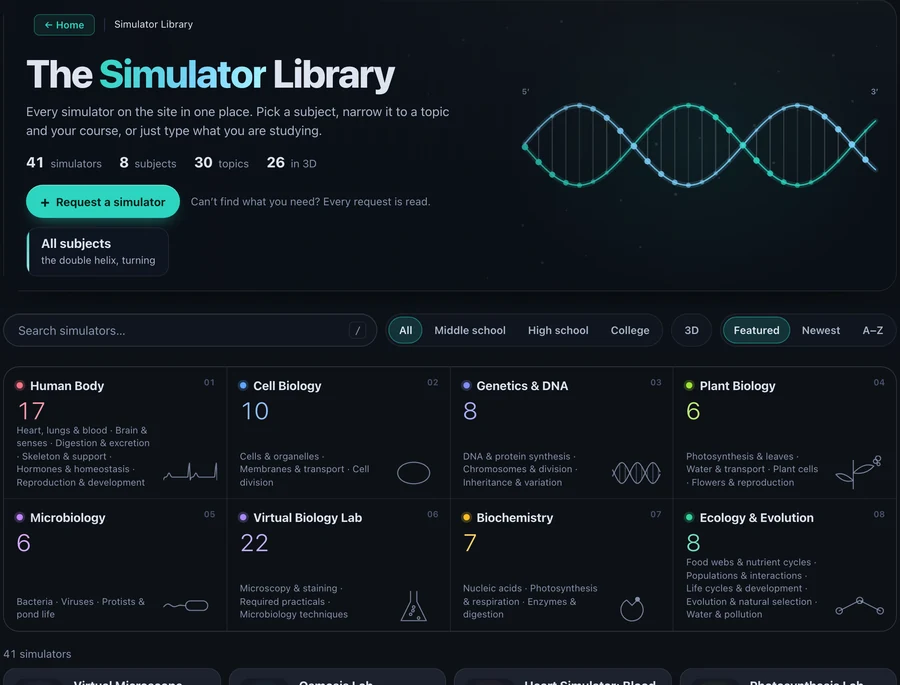
- VisualizeBiology covers all five with 41 free browser simulators, 26 of them in 3D, with no account and no download.
Biology has a practical-work problem that physics and chemistry mostly avoid. A pendulum behaves the same in every school. A titration works on a Tuesday afternoon in a cold prep room. But a biology practical depends on living material that arrives late, dies early, costs money or raises an ethics objection from a parent, and a class of thirty gets one shot at it.
So the topics that need observation most are the ones students see least. Mitosis is taught from a page of six still photographs. Osmosis becomes a worksheet. Half the class never focuses a microscope properly because there were twelve scopes and forty-five minutes.
That gap is what a good simulation fills. Not the labelling, which a textbook already does well, but the part a textbook structurally cannot do: time, control and repetition. This article is a working kit of the biology simulations I would hand a teacher on day one, grouped by the lesson they actually belong in.
What makes a biology simulation worth classroom time
Plenty of "interactive" biology resources are a labelled diagram with hover text. They look busy and teach very little. Before putting one in front of a class, I check three things.
Does it change over time? Cell division, the cardiac cycle, population growth and embryo development are processes. If the resource shows you a frozen frame per stage, it is a diagram with tabs.
Can the student change a variable and be wrong? Raise the temperature past the optimum and the enzyme should denature. Remove the predator and the prey population should overshoot and crash. A simulation that only ever produces the textbook answer removes the thinking.
Does it produce a number? This is the one most resources fail. A session that ends with a count, a rate or a ratio can be marked, graphed and argued about. A session that ends with "that was cool" cannot.
Everything below passes all three. These are built by VisualizeBiology, the biology sister site to MechSimulator, written with Dr. Shaniba Madiyam Kallingal on the biology side. Same approach as the engineering tools here: free, no sign-up, runs in the browser, works on a school Chromebook.
Cell biology: division you can actually watch
Cell division is where the simulation argument is easiest to win. Students are asked to learn an ordered sequence of stages from photographs that are, by definition, dead and out of order.
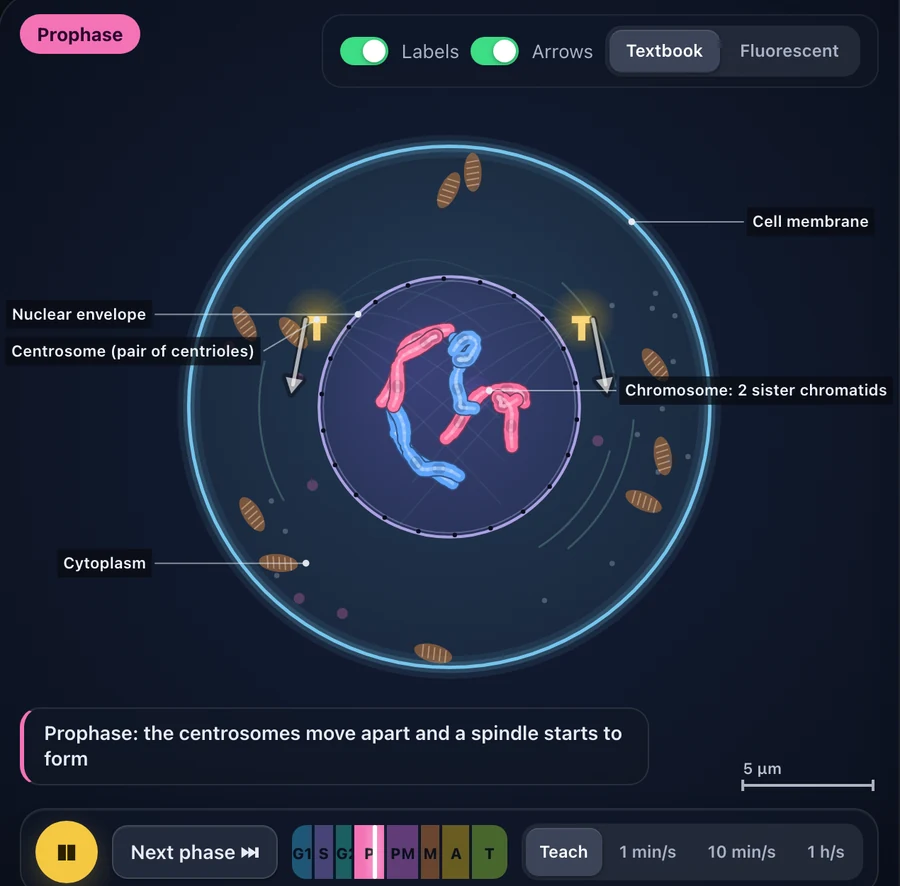
The mitosis simulator runs the whole cycle as one continuous animation with a phase ring showing where you are in the 24 hours. You can slow it to one minute per second, step forward phase by phase, or switch the cell from animal to plant and watch the cell plate form instead of a cleavage furrow. It also breaks on purpose: turn off the G1 checkpoint, or the spindle checkpoint, and watch what uncontrolled division looks like. That single toggle teaches more about cancer biology than a paragraph does.
The meiosis simulator handles the part students reliably fail, which is crossing over and the reason four gametes are genetically different. Running the two side by side answers the mitosis-versus-meiosis comparison question better than the table everyone memorises. For the organelles themselves, the animal and plant cell model is not a static map: respiration, photosynthesis and protein synthesis all run inside it.
The whole cell biology section holds ten simulators, including the osmosis lab, which is worth its own mention below.
Microscopy, and the practical skill exams keep testing
Here is a scene that repeats every year. Thirty students, twelve working microscopes, one period. By the time the last pair gets to the bench, the lesson is over and four of them have genuinely learned to use the coarse and fine focus. The rest watched.
A virtual microscope fixes the ratio problem, because every student has their own. This one runs from 4× to 100× oil immersion with separate coarse and fine focus, a lamp you can set to the wrong brightness, a graticule for measurement and 11 slides including onion epidermis, cheek cells and blood. Students can measure a cell with the graticule, count cells in a field, and download a lab report at the end.
That report matters more than it sounds. It turns a screen activity into something you can collect and mark.
The same section covers the organisms that go under the lens: a bacteria simulator with growth curves and Gram staining, a virtual amoeba showing pseudopodia and binary fission, and a virus virtual lab covering 17 viruses, the lytic and lysogenic cycles and a plaque assay.
Genetics: from a Punnett square to a DNA fingerprint
Genetics is the unit where students can get the right answer with no understanding at all. Fill the grid, count the boxes, write 9:3:3:1. Ask them what the ratio means about gametes and the room goes quiet.
The Punnett square calculator handles monohybrid, dihybrid and trihybrid crosses, sex-linked traits and blood groups, and shows each offspring genotype with its phenotype rather than just a ratio. It also runs a chi-square test on the result, which is where the statistics half of the syllabus quietly lives.
For molecular genetics, the interactive 3D DNA model builds the double helix from a single nucleotide upward, with the 1′ to 5′ carbons labelled and the antiparallel strands and grooves visible from any angle. Pair it with the codon chart and DNA-to-protein translator: paste any sequence, watch it transcribed and translated, then introduce a point mutation and see whether it is silent, missense or nonsense. That last step is the whole mutation topic in one interaction.
The gel electrophoresis virtual lab is the one students enjoy most. Load the wells, run a lambda DNA digest, size the unknown bands against a standard curve, then solve a crime scene or a paternity case with the result. The full genetics and DNA section runs to eight simulators.
Human body systems without a model skeleton in the corner
Human biology is the largest block on the site, with 17 simulators covering the body systems. Most of them are built as 3D models you can rotate and take apart, which is the thing a wall chart cannot do.
The 3D heart simulator follows blood through a beating heart and lines the cycle up against the Wiggers diagram, the ECG trace and a pressure-volume loop, so the valve timings stop being arbitrary. The interactive 3D brain model lifts each lobe out to show its functional areas, cuts the brain in half and runs stroke scenarios. The kidney and nephron simulator takes urine formation down to the filtration, reabsorption and secretion steps rather than leaving it as three words on a flow chart.
Two more are worth putting on a lesson plan directly. The human eye simulator covers accommodation, the pupil reflex, the blind spot and the corrections for myopia and hyperopia, which makes it a genuine bridge to the ray optics simulator in a combined-science course. And the blood glucose regulation simulator is the clearest negative-feedback demonstration I have found: eat, inject, exercise, and watch insulin and glucagon fight it out.
If you teach the skeleton, the 3D skeleton has all 206 bones clickable and searchable. The rest sit in the human body section.
Dissection without a specimen
Dissection is the sharpest ethical and logistical pressure point in school biology, and the honest position is that a virtual version is not a full replacement. It cannot teach scalpel control or the texture of real tissue.
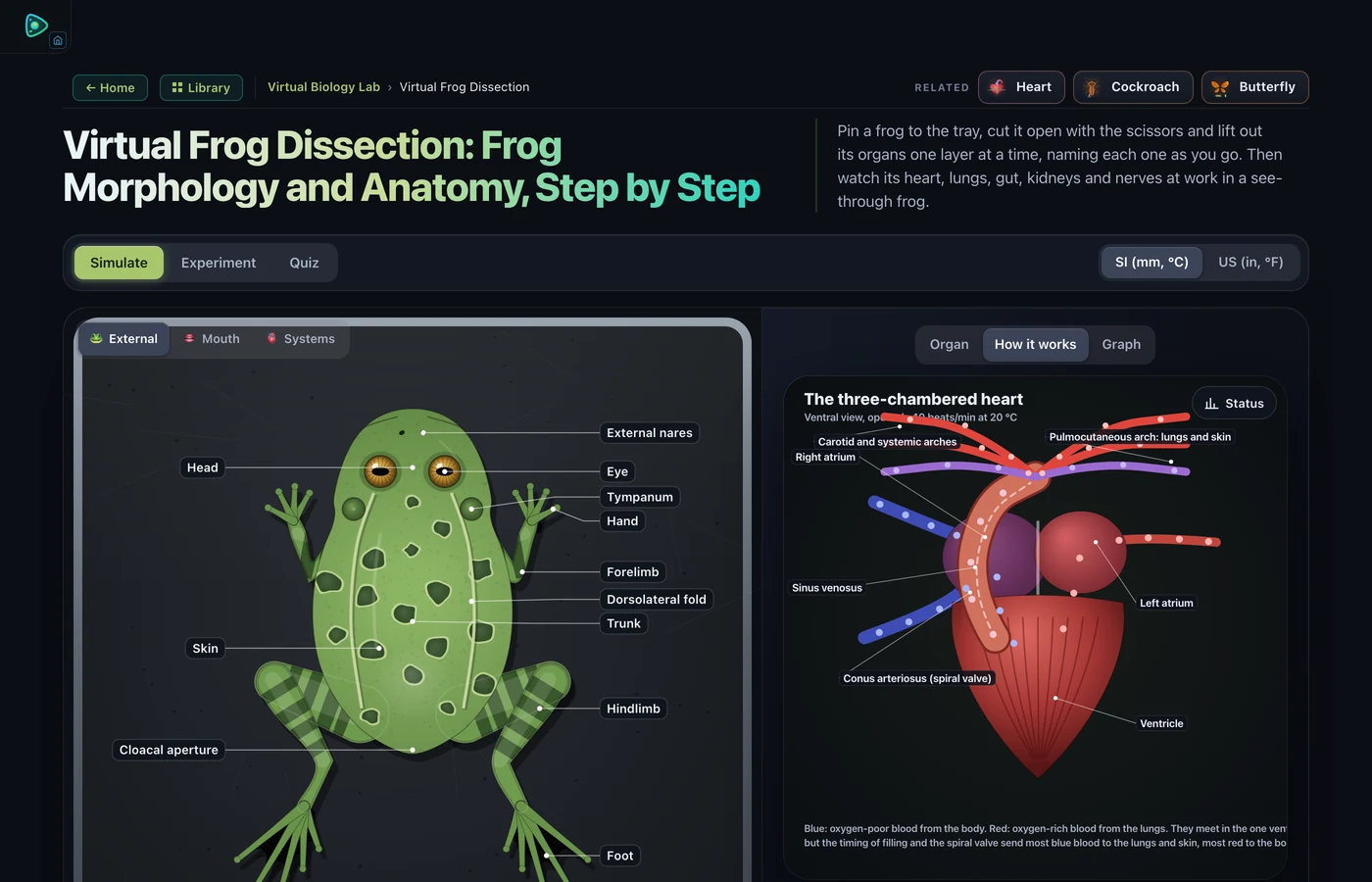
What it can do is everything around that. The virtual frog dissection in the hero image above pins the specimen, cuts it open one layer at a time, names each organ as it is lifted out, then switches to a see-through view where the heart, lungs, gut, kidneys and nerves keep working. A student can undo a wrong cut and start again, which they cannot do at the bench. There is a virtual cockroach dissection as well, following the same NCERT and AP sequence.
Used as preparation before a single real dissection and as revision afterwards, it raises the value of the one specimen you do use. Used alone in a school that has decided against animal dissection, it covers the examinable content.
Plants, ecology and the problems that take too long
Some biology happens on a timescale a lesson cannot contain. A pondweed experiment needs a stable light source and twenty minutes to produce countable bubbles. A population study needs generations.
The photosynthesis lab compresses the first one. Change light intensity, carbon dioxide concentration and temperature independently, count pondweed bubbles or float leaf discs, and find which factor is limiting. Because the variables are separable, students can do the controlled-variable reasoning that a real bench rarely allows in one period.
The xylem and phloem simulator covers transport and transpiration, and sits in the plant biology section with pollination and plant reproduction. For ecology, the population growth simulator generates J and S curves, carrying capacity, predator-prey cycles and age pyramids, and the natural selection simulator runs rabbits on an island against foxes and snowfall, with Hardy-Weinberg and genetic drift behind it. The nitrogen cycle simulator handles the nutrient-cycle half of the topic.
Biochemistry, and where the maths comes back
Enzymes are where biology turns quantitative, and where a lot of students lose the thread. The enzyme kinetics simulator shows the enzyme binding substrate while plotting the Michaelis-Menten curve beside it:
\[v = \dfrac{V_{\max}[S]}{K_m + [S]}\]
Change the temperature or the pH and the curve moves. Add an inhibitor and the student has to work out from the Lineweaver-Burk plot whether it is competitive or non-competitive, which is a far better question than asking them to define the two terms.
The osmosis lab does the same for water potential. It runs the membrane chamber, a reverse-osmosis piston, and the three classic practicals: potato cores, the naked egg and red blood cells in salt and sugar solutions.
And microscopy work has its own arithmetic. The mitotic index from an onion root tip count is:
\[\text{Mitotic index} = \dfrac{\text{cells in mitosis}}{\text{total cells counted}} \times 100\%\]
Having a whole class count the same simulated field and then comparing their answers turns counting error into the lesson, which is hard to arrange with thirty different real slides.
Try It Yourself
All tools below are free, with no account and no download. Open them on any device.
A five-lesson starter sequence
Lesson 1, microscopy. Ten minutes on the virtual microscope with one instruction: find the onion epidermis at 40× and measure one cell with the graticule. Collect the numbers. Discuss the spread.
Lesson 2, cell division. Run mitosis at 10 min/s with labels on, then have students count a simulated onion root tip field and calculate the mitotic index. Compare class results before giving the accepted value.
Lesson 3, inheritance. A dihybrid cross on paper first, then the same cross in the Punnett square tool, then the chi-square. The order matters: the tool checks their work rather than doing it.
Lesson 4, a rate. Photosynthesis or enzyme kinetics. One variable changed at a time, a table filled in, a graph drawn by hand from the simulated data.
Lesson 5, a system. The heart or the kidney in 3D, used as the explanation stage, followed by a labelled diagram drawn from memory with the screen closed.
Five lessons, five different uses of a simulation, and four of them end with a number on paper. That is the pattern I would protect.
Where biology meets the physics and chemistry benches
Combined science teachers end up crossing subject lines constantly, and a few of the engineering and physical-science tools on this site slot straight into a biology scheme of work. The ray optics simulator pairs with the eye. The litmus and pH simulator supports enzyme pH work. The specific heat capacity simulator underpins any thermoregulation or calorimetry lesson.
If you teach across all three sciences, the companion round-ups here cover the other two: five free virtual labs for high school science and the chemistry simulator guide.
Key Takeaways
- A simulation earns classroom time when it shows change over time, lets the student be wrong, and ends in a number. Labelled diagrams with hover text do none of those.
- Microscopy is the highest-leverage thing to virtualise, because the real bench always has a device-to-student ratio problem and the skill appears in every unit.
- Cell division and inheritance are the two topics where students most often produce correct answers without understanding. Both are fixed by making the process run and the variables move.
- Virtual dissection is strongest as preparation and revision around one real specimen, rather than as a straight replacement for it.
- Rate experiments (photosynthesis, enzyme kinetics, population growth) benefit most from compression, because the real versions need more time than a lesson has.
- The 41 simulators at VisualizeBiology are free and browser-based, with 3D views on laptops and tablets and a 2D fallback on phones, so a lesson plan survives whatever device the class turns up with.
Frequently Asked Questions
What is the best free interactive biology simulation for high school?
It depends on the topic, but a virtual microscope is the most reusable starting point because microscopy appears in almost every syllabus unit. After that, a mitosis simulator and a Punnett square calculator cover the two topics students most often get wrong. VisualizeBiology hosts all three free, in the browser, with no account and no install.
Can a virtual dissection replace a real one?
Not entirely. A real dissection teaches scalpel control, tissue texture and the genuine messiness of an organism, and nothing on a screen reproduces that. A virtual dissection is better at the naming and the system-level understanding, because students can undo a wrong cut, look at one organ system at a time and repeat the whole sequence before an exam. Most schools get the best result by using the virtual version as preparation and revision around a single real dissection.
How do you calculate the mitotic index in an onion root tip lab?
Count the cells visibly in mitosis (prophase, metaphase, anaphase or telophase) and divide by the total number of cells counted in the field, then multiply by 100 to get a percentage. The result estimates the proportion of the cell cycle spent in M phase. A simulated onion root tip slide lets a whole class count the same field and compare numbers, which makes the counting error itself a teaching point.
Do these biology simulations work on school Chromebooks and phones?
Yes. They are plain web pages built with HTML, CSS and JavaScript, so they run in any modern browser with no plugin, no login and no download. Tools that offer a 3D view open in 3D on a laptop or tablet and fall back to a 2D view on a phone, so the lesson still works on whatever device a student brings.
How should a teacher fit simulations into a normal biology lesson?
Use the simulation for the part of the lesson that a textbook diagram cannot carry: the change over time, or the variable the student needs to control. Ten minutes of guided use with one written question attached is usually more effective than a full period of free exploration. Give students a number to produce, such as a mitotic index, a rate of bubble production or a predicted offspring ratio, so the session ends with evidence rather than impressions.
The argument for simulation in biology is not that screens beat benches. It is that a lot of biology never reaches a bench at all, and the topics that lose out are the ones students find hardest: the processes, the rates and the systems that only make sense in motion.
Pick one topic you teach badly because the practical never works, and try the simulated version of it next term. Start at the biology simulator library and filter to your level. It costs nothing, and the first lesson will tell you whether it belongs in your scheme of work.