Litmus Paper Test — Colour Chart & Virtual Lab
Test chemicals with red litmus, blue litmus & universal pH paper

Click "New Problem" to begin.
Click "Start Quiz" to begin a 5-question round.
1 Overview
The Litmus Paper Test Virtual Lab lets you perform acid-base indicator tests on 15 common chemicals (plus custom chemicals you define) using three types of indicator paper: red litmus, blue litmus, and universal pH paper. Each chemical has accurate pH values and realistic colour-change behaviour. The readout panel reveals chemical name, formula, pH value, acid-base classification, and litmus result after each test. Sound effects accompany the pour and dip actions for a more immersive experience. The lab opens as a 3D lab bench you can walk round and work with your own hands (a flat 2D bench is one click away), and Auto Test can run the whole experiment for you.
2 Running a Test (Simulate Mode)
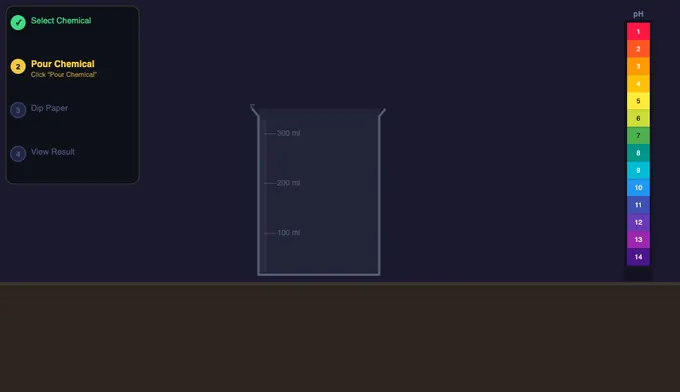
The lab opens in 3D on a computer or tablet (on a phone it opens in 2D, where 3D is cramped — the switch still offers it); the View switch beside the paper choice changes to the flat 2D bench and back, and the page remembers which you used. The step-by-step indicator in the top-left of the bench guides you through each test in either view. Follow these steps:
- Click a chemical button (or + Custom to enter your own pH value) — in 3D you can also tap its bottle on the shelf.
- Choose a paper type: Red Litmus, Blue Litmus, or Universal (pH) — or click its vial on the bench.
- Click the reagent bottle (or Pour Chemical) — it is lifted and tipped, and 50 mL pours into the beaker.
- Click Dip Paper — the strip descends and the colour change animates over 2 seconds.
- Read the five readout cards that appear: Chemical, Formula, pH Value, Classification, and Litmus Result.
- Click Reset Lab to clear and run another test, or select a new chemical directly (the lab auto-resets).
- Or press Auto Test to have steps 3–5 done for you (see section 2c).
After a result appears, use Export PNG to download a snapshot of the lab canvas, or Copy Result to copy the result text to your clipboard. Right-clicking on the canvas also gives you these options.
2b The 3D Lab Bench
The lab opens as a full chemistry bench in 3D (press 2D beside the paper choice for the flat view, and 3D Lab to come back): a reagent shelf with every chemical in its own labelled bottle, a 100 mL beaker, a retort stand whose clamp holds the forceps and the strip, the three vials of paper, the universal indicator chart on the wall and a sink. It is the same experiment as the flat view — the readout cards, the chain of steps and the results all come from the same calculation — and the choice is remembered on this device. 2D takes you back, mid-test if you like.
- Do the test with the objects: tap a bottle on the shelf to take that chemical to the bench, tap a vial to change paper, tap the working bottle to pour (or drag it to the beaker and tip it yourself — let go and it finishes), tap the beaker to dip (or drag the clamp down into the liquid), and tap the sink to rinse everything and start again. The Custom pH… bottle on the shelf opens the custom panel.
- Look around: drag the empty bench or wall to orbit; right-drag, Shift-drag or two fingers to pan; pinch, Ctrl + scroll or the + / − buttons to zoom. The mouse wheel zooms toward the pointer once you have clicked the bench, so scrolling the page never gets caught. Double-click (or double-tap) an object to fly to it, and empty space to come back.
- Camera: Auto follows the experiment — shelf, bench, close-up for the pour and the dip, then the strip beside the chart for the result. Bench, Close-up, Chart and Shelf hold a fixed view, and Labels names the apparatus.
- Auto Test runs the whole experiment for you, filmed from many camera angles — see section 2c.
- Keyboard (click the bench first): Enter does the next step, P pour, D dip, R reset, A Auto Test, 1 2 3 choose the paper, arrow keys orbit, + / − zoom and 0 returns to the automatic camera.
The pour is worked out in three dimensions: the bottle tips about its lip just far enough for the liquid left in it to reach the lip, so it tips further as it empties, and the beaker gains exactly the 50 mL the bottle loses. If your browser cannot run WebGL the 3D button is switched off and the flat bench carries on as before.
2c Auto Test — Watch the Whole Experiment
Auto Test is in the Control Panel under the bench, in both views (or press A on the 3D bench). Choose a chemical and a paper, press it, and the simulator does the experiment for you from start to finish — the same steps, the same chemistry and the same readout cards as doing it by hand:
- Take — the bottle is lifted from the reagent shelf and carried to the bench.
- Pour — it is unstoppered, tipped about its lip and 50 mL runs into the beaker.
- Dip — the clamp lowers the paper 10 mm into the liquid and the indicator reacts as the wet front climbs the strip.
- Read — the strip is lifted out and shown beside the indicator chart, with the pH and the litmus verdict.
In 3D it plays like a short lab video of about 20 seconds. The camera cuts between angles — close on the shelf, following the bottle, a low view of the pour, the beaker from above, the other side for the dip, a close-up of the paper changing colour, and finally the strip against the chart — and holds on each stage, with the pour and the colour change slowed down so you can see them, and a caption naming each step. You can drag to look around while it runs and the camera stays where you put it. In 2D the same test runs at normal speed in about 6 seconds.
If the sample is already poured or tested, Auto Test rinses the beaker first and starts again with the same chemical and paper — so you can try all three papers on one chemical by changing the paper and pressing it again. Press Stop Auto Test, or do anything yourself (choose a chemical or paper, press Pour, Dip or Reset, switch view), and it stops where it is.
3 Custom Chemical Testing
Click the + Custom button in the chemical row to open the custom pH panel. Enter a name (e.g. "Orange Juice") and drag the pH slider from 0 to 14. The display updates in real time with the pH colour. Click Test It to add your custom chemical as a starred entry in the chemical row and run it through the normal test procedure. Your custom entry is saved for the session so you can switch paper types and re-test without re-entering the values.
4 Background Theory
Click the Explore tab for concept cards organised into four categories: pH Scale, Indicators, Acids, and Bases. Topics include the logarithmic nature of pH, how litmus dye changes structure at the molecular level, strong vs weak acids, neutralization reactions, and real-world applications. Each card shows the key formula and a worked example.
5 Practice & Quiz Modes
Practice mode generates 12 different question types including classification, litmus colour prediction, pH calculation, dilution problems, and neutralization products. Click New Problem, answer by selecting an option or typing a number, then click Check. Your running score is displayed. Click Show Solution to see the worked explanation.
Quiz mode presents 5 randomly selected questions per round from a pool of 15. After all 5, you see your score, star rating, and a full answer breakdown. Click Retake Quiz for a fresh set.
6 Lab Tips
- Key rule: blue litmus turns red in acid; red litmus turns blue in base. Neither changes in neutral solutions.
- Universal pH paper is more informative — it gives a colour for every pH level, not just acid or base.
- Test the same chemical with all three paper types to compare the level of information each provides.
- The pH scale is logarithmic: pH 3 is 10× more acidic than pH 4, and 100× more acidic than pH 5.
- Use + Custom to test any pH from 0 to 14 — useful for exploring edge cases or exam scenarios.
- Right-click the canvas after a test to quickly export a PNG or reset the lab without scrolling to the buttons.
- Common exam values to memorise: HCl pH 1, lemon juice pH 2, vinegar pH 3, pure water pH 7, baking soda pH 8, NaOH pH 14.
Understanding Litmus Paper Tests and pH Indicators
Litmus paper tests whether a substance is acidic, basic, or neutral. Blue litmus turns red in acids (pH below 7); red litmus turns blue in bases (pH above 7). At pH 7 — neutral — neither paper changes colour. This virtual lab lets you test 15 chemicals with red litmus, blue litmus, and universal pH paper and observe animated colour changes in real time.
What colour does litmus paper turn in an acid or base?
| Chemical | pH | Class | Red Litmus | Blue Litmus |
|---|---|---|---|---|
| Hydrochloric Acid | 1 | Strong Acid | Stays Red | Turns Red |
| Lemon Juice | 2 | Weak Acid | Stays Red | Turns Red |
| Vinegar | 3 | Weak Acid | Stays Red | Turns Red |
| Pure Water | 7 | Neutral | No Change | No Change |
| Baking Soda | 8 | Weak Base | Turns Blue | Stays Blue |
| Ammonia | 11 | Strong Base | Turns Blue | Stays Blue |
| Sodium Hydroxide | 14 | Strong Base | Turns Blue | Stays Blue |
What is the pH scale and how is it measured?
The pH scale runs from 0 to 14 and quantifies how acidic or basic a solution is. It is defined as the negative base-10 logarithm of the hydrogen ion concentration: pH = −log[H⁺]. Because the scale is logarithmic, each whole number change represents a tenfold difference in acidity. Pure water at 25°C has a pH of exactly 7. Strong acids like hydrochloric acid approach pH 0, while strong bases like sodium hydroxide reach pH 14.
What is the difference between litmus paper and universal indicator?
Litmus paper gives a binary result — acid or base. Universal indicator paper (pH paper) contains a blend of dyes — typically methyl red, bromothymol blue, and phenolphthalein — that produce a continuous spectrum from red (pH 1) through green (pH 7) to violet (pH 14). This lets you estimate the exact pH rather than just the acid-base category, making it ideal for quantitative experiments such as soil testing or aquarium monitoring.
What are common examples of acids and bases in everyday life?
Lemon juice (pH 2) and vinegar (pH 3) are weak acids found in cooking. Black coffee (pH 5) and tomato juice (pH 4) are mildly acidic. On the basic side, baking soda solution (pH 8–9), household ammonia (pH 11), and bleach (pH 13) are everyday examples. Understanding pH helps explain cleaning power, taste, and safety requirements for each substance.
Can you do a litmus test in a 3D virtual lab?
Yes — this simulator opens as a 3D virtual chemistry lab. You stand at a real-looking lab bench with a reagent shelf holding every chemical in its own labelled bottle, a 100 mL beaker, a retort stand whose clamp holds the forceps and the test strip, vials of red litmus, blue litmus and universal indicator paper, an indicator colour chart on the wall and a sink. You do the test with your own hands: tap a bottle on the shelf to bring it to the bench, drag it to the beaker to tip it and pour, drag the clamp down to dip the paper into the solution, and watch the colour change happen on the wet end of the strip before comparing it with the chart. Drag to walk round the bench, pinch or scroll to zoom in on the paper, and rinse everything at the sink to start again.
Press Auto Test and the whole experiment plays out on its own, filmed from several camera angles: the bottle taken from the shelf, a low view of the pour, the beaker from above, a close-up of the indicator reacting and the finished strip held beside the pH chart. It is a safe way to see a litmus test exactly as it is done in a school laboratory, on a computer, tablet or phone, and the flat 2D bench is still one click away. The same 3D approach powers our 3D micrometer and 3D vernier caliper.
Who uses a litmus paper test simulator?
This virtual lab is designed for secondary-school and vocational chemistry students, science teachers preparing demonstrations, and engineering learners exploring physical chemistry. It provides a safe, interactive environment to master pH concepts without handling real chemicals, with animated colour transitions that make acid-base theory tangible and memorable.
Explore Related Simulators
If you found this litmus test simulator helpful, explore our Boyle's Law Simulator, Ideal Gas Law Simulator, Phase Change Simulator, Specific Heat Capacity Simulator, and Titration Simulator for more hands-on chemistry and physics practice. To write the neutralisation reactions behind these colour changes, try the balancing chemical equations simulation.
Updated